
Series 05
Kopo Kopo
Series 05
Kopo Kopo
Payments
Kopo Kopo Integration for POS Systems: The Complete Guide
How Kopo Kopo connects to a POS — Buy Goods tills, STK Push, and signed webhooks that match every M-Pesa payment to a sale automatically. The complete guide for Kenyan retailers.
25 August 2026 · Kiosk
At the counter, the customer's phone beeps, they type a PIN, and the money leaves their M-Pesa. That's the easy part. The hard part is your side: knowing the payment actually landed, tying it to the right sale, and having the whole day's M-Pesa add up at close — without someone squinting at phone messages at midnight.
This guide is about that second half: Kopo Kopo integration for POS systems. We'll cover what Kopo Kopo actually is, how a connected till turns an M-Pesa payment into a completed sale automatically, and what to look for in a POS that does it properly. If you run a shop in Kenya and want Buy Goods, Till, or STK Push payments to stop being a bookkeeping chore, this is the guide for you.
1. What Is Kopo Kopo — and Why It Matters for Retailers
Kopo Kopo is a Kenyan payment company that sits on top of M-Pesa (and other mobile money) and gives businesses a single way to accept it and move it. To a customer it's invisible — they're paying M-Pesa either way. To a retailer it's the difference between a till number that only receives money and a payment channel your systems can actually use.
A plain Till Number does one thing: money arrives. Kopo Kopo turns that into a set of tools:
- STK Push — your till sends the payment prompt to the customer's phone; they confirm the amount and enter their PIN.
- Buy Goods (Till) — customers pay your till number directly, and Kopo Kopo confirms the payment the moment it happens.
- Paybill — for larger or business-to-business payments under a paybill account.
- Webhooks and transaction data — every payment arrives as a machine-readable notification, so software can act on it instantly.
- Send Money — pay suppliers or staff out of the same integration.
Why it matters: in Kenya, mobile money is how customers pay. Kopo Kopo is how that payment becomes data your till can act on — the ingredient that lets a POS close a sale, print a receipt, and drop stock without a human checking a phone.
2. How Kopo Kopo Integration Works with a POS
At a plain-English level, the integration is four steps:
- You have a Kopo Kopo account with a till or paybill — the destination your customers pay into.
- Your POS connects to it with API credentials — the same idea as signing in, but for software. This is the 'integration.'
- When a customer pays, Kopo Kopo sends a signed webhook — a payment notification your till can trust, because it's verified and can't be faked by a customer or a staff member.
- The till matches the notification to the open sale — by amount, and where available the paying number — and closes it: the receipt prints, stock drops, and the payment lands in the shift record.
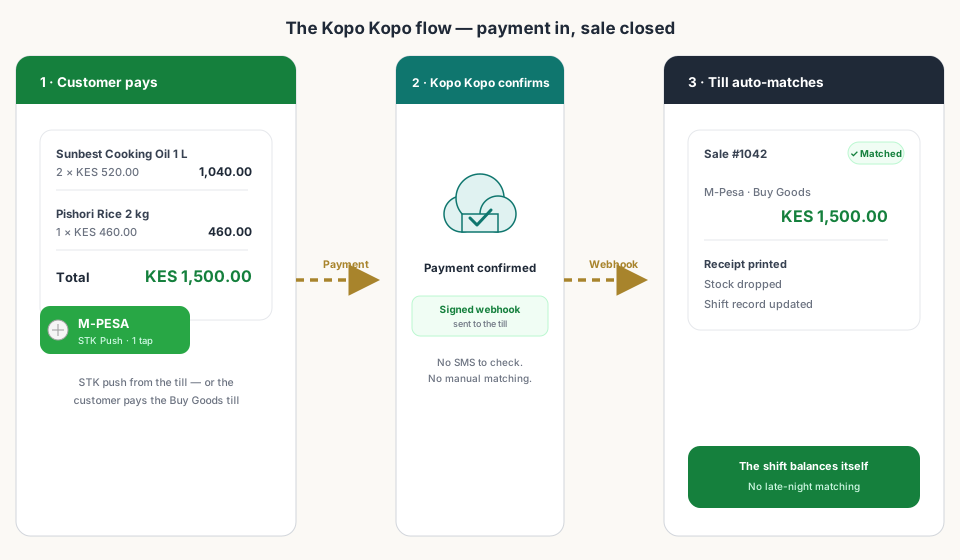
There are two ways the payment itself happens at the counter, and a good POS supports both:
| STK Push (till starts it) | Buy Goods till (customer starts it) | |
|---|---|---|
| Who starts it | The cashier taps M-Pesa on the till | The customer pays your till number directly |
| What the customer sees | A prompt on their phone: amount + Enter PIN | The normal M-Pesa 'Buy Goods' flow on their phone |
| What confirms the sale | Confirmation from Kopo Kopo to the till | A signed webhook, matched by amount and paying number |
| Best for | Fast one-tap checkout at the counter | Shops whose customers already pay the till directly |
Either way, the till finds out from Kopo Kopo itself — not from a staff member checking an SMS — and that's the whole point. The confirmation is automated, immediate, and unforgeable.
3. Manual Reconciliation vs. an Integrated POS
Without an integration, your till and your M-Pesa are two separate ledgers. Sales live in the POS; payments live in a string of messages on someone's phone. At close, the two are joined by hand — a staff member scrolls the messages, matches each payment to a sale, and hopes nothing was missed.
Put a number on that. Fifty M-Pesa sales a day — nothing for a busy mini-mart — at even thirty seconds each to check and match is twenty-five minutes of your most senior person's time every single night. A mismatch means a call to a customer, a disputed payment, or a quiet write-off. And the harder the day, the later the close, the worse the matching gets.
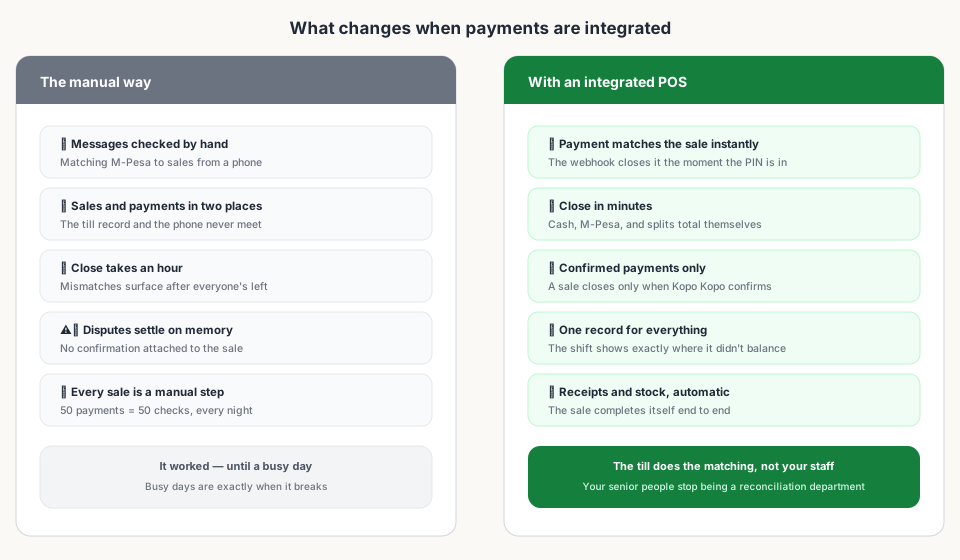
With an integrated POS there's nothing to match. The webhook closes the sale the moment the customer's PIN is in, and the shift report adds up automatically — cash here, M-Pesa there, matching what actually hit your business account.
4. What an Integrated Till Actually Gets You
Integration isn't a technology feature — it's a set of concrete, daily outcomes:
- Faster checkout — no typing a till number into a phone and no asking the customer to 'confirm with M-Pesa.' One tap, one PIN.
- Fewer disputes — a customer insists they paid; the till has the confirmation, with the amount, the time, and the paying number.
- Accurate daily till reports — M-Pesa totals come from confirmed payments, not from memory.
- Less short-changing and fraud — a payment only closes a sale when Kopo Kopo confirms it; nobody can claim a payment that never happened.
- Staff accountability — every sale is tied to a real payment, so a shift either balances or shows exactly where it didn't.
5. What to Look for in a POS with Kopo Kopo Support
Not all 'Kopo Kopo support' is equal. A POS that just lets you type a till number for display on a receipt is not integrated. Here's the checklist:
- Native STK Push — the till sends the payment prompt itself; it doesn't redirect you to a separate app or payment screen.
- Buy Goods till matching — customers who pay your till directly still get their sale matched automatically, by amount and paying number.
- Signed webhooks under the hood — confirmations come from Kopo Kopo and are verified, so they can't be faked.
- Payments and sales in one record — M-Pesa, cash, and split payments live in the same sale and the same shift report.
- No per-payment plugin fees — the integration is part of the POS, not a paid add-on module with its own subscription.
- Payouts, if you pay suppliers — Send Money from the same system means one place to see money in and money out.
Kiosk.ke checks those boxes. Its till runs Kopo Kopo for M-Pesa — STK Push from the counter and Buy Goods till matching — with every payment auto-matched to the sale in real time, and Kopo Kopo Send Money built in for paying suppliers. It's included from the free plan: 300 products, one cashier, and M-Pesa working from your first ring.
Read next:
- How to Connect Kopo Kopo to Your POS SystemThe step-by-step setup — credentials, webhook, and a test payment.
- Kopo Kopo Buy Goods vs. Till Number vs. PaybillWhich payment channel belongs in your shop's till setup.
- Kopo Kopo API Webhooks Explained for Non-DevelopersHow payment confirmations reach your till — in plain English.
- End-of-Day Reconciliation: Manual vs. AutomatedWhat your close looks like when the till does the matching.
- Kopo Kopo vs. the Direct Safaricom Daraja APIRaw Safaricom API versus a payment aggregator — which fits a POS.
- Best POS Systems in Kenya with Kopo Kopo IntegrationRanked on how deep the Kopo Kopo integration actually goes.
- Is Kopo Kopo Safe? Security and Settlement ExplainedWhere your money sits and why confirmations can't be faked.
Frequently asked questions
What is Kopo Kopo and how is it different from a till number?
Kopo Kopo is a Kenyan payment company that sits on top of M-Pesa and gives businesses one way to accept it. A plain till number only receives money; Kopo Kopo adds STK Push, Buy Goods (till) confirmations, webhooks, transaction data, and Send Money payouts — the pieces a POS needs to close sales automatically.
How do I connect Kopo Kopo to my POS?
You connect your Kopo Kopo account to the POS with API credentials, then point it at your till or paybill. The POS registers a webhook so Kopo Kopo can send it payment confirmations, and you test with a small payment before going live. Most turnkey POS systems — Kiosk.ke included — handle the connection in their payment settings.
Can customers still pay my Buy Goods till if the POS uses STK Push?
Yes. A good POS supports both: STK Push starts the prompt from the till, and customers who prefer paying the till number directly still get their sale matched automatically — Kopo Kopo confirms the payment by amount and paying number, and the till closes the sale.
Why aren't my M-Pesa payments syncing with my sales records?
Usually because there is no real integration — the till and the M-Pesa account are two separate ledgers joined by hand. With a connected POS, every payment arrives as a signed webhook and matches itself to the open sale. Misconfigured credentials or an unregistered webhook URL cause the same symptom.
Is Kopo Kopo safe?
Kopo Kopo is a long-established Kenyan payment provider working with Safaricom's systems, and money settles to your own M-Pesa business account — Kopo Kopo does not hold your takings. Confirmations reach your till as signed webhooks, so a payment can't be claimed without Kopo Kopo having confirmed it.
What does Kopo Kopo cost a retailer?
Kopo Kopo charges per-transaction fees for its payment products, which vary by channel (Buy Goods, Paybill, STK Push). Whether you or the customer carries the cost depends on your setup. A POS that integrates Kopo Kopo natively doesn't add its own per-payment module fees on top.
More from this series
- PaymentsKiosk.ke's Kopo Kopo Integration: Why It's the Best for Kenyan ShopsHow Kiosk.ke connects Kopo Kopo to your till — native STK Push, Buy Goods till matching, signed webhooks, and supplier Send Money — and why that makes it the best Kopo Kopo integration in Kenya.
- Getting startedHow to Connect Kopo Kopo to Your POS System (Step-by-Step)Step by step: connect your Kopo Kopo account to your POS — API credentials, environment, till numbers, webhook subscription, and a test payment before you go live.
- PaymentsKopo Kopo Buy Goods vs. Till Number vs. Paybill: Which One for Your Shop?Buy Goods (till), Paybill, and STK Push all move money through M-Pesa — but they behave differently at the counter. Which one belongs in your shop's till setup?
- Getting startedSetting Up STK Push Checkout on Your POSHow STK Push checkout works at a Kenyan till — the customer gets the prompt on their phone, confirms the amount, and the sale closes itself. Setup, testing, and what can go wrong.
- PaymentsKopo Kopo API Webhooks Explained for Non-DevelopersWebhooks are how your till finds out a payment happened — in plain English. What a signed payment notification is, why it beats checking messages, and what it means for your shop.
- PaymentsWhy Your M-Pesa Payments Aren't Syncing with Your Sales RecordsM-Pesa payments that never appear in your sales reports are usually one of five fixable problems — and the fix is almost always a real integration, not more manual checking.
- OperationsEnd-of-Day Reconciliation: Manual M-Pesa Checking vs. Automated POS MatchingThe nightly ritual of matching M-Pesa messages to sales — and what your close looks like when the till does the matching instead.
- PaymentsHow to Reduce Payment Disputes at the Till with Integrated ConfirmationsA customer insists they paid, your cashier says no — that's a dispute with no evidence. Integrated confirmations give both sides a record that settles it in seconds.
- ComparisonKopo Kopo vs. the Direct Safaricom Daraja API: Which Should Your POS Use?Daraja gives you the raw Safaricom API. Kopo Kopo wraps it with support, webhooks, and multiple payment channels. What each means for your shop's till.
- RankingsBest POS Systems in Kenya with Kopo Kopo IntegrationPOS systems in Kenya that work with Kopo Kopo — ranked on how deep the integration goes: native STK, till matching, webhooks, and settlement reports.
- GuidesKopo Kopo Fees and How They Affect Your Margins as a RetailerWhat Kopo Kopo charges per transaction, who pays it, and how to keep mobile money costs from eating your margin.
- GuidesKopo Kopo Integration for Butcheries and Weighed-Goods RetailersWeighed goods and mobile money at the same counter: how Kopo Kopo payments fit a butchery's flow — weigh, price, pay, and the sale matches itself.
- OperationsKopo Kopo for Mini-Marts: Handling High Transaction Volume at the TillMini-mart traffic means a hundred small M-Pesa payments a day. How integrated Kopo Kopo keeps the queue moving and the close honest.
- GuidesIs Kopo Kopo Safe? Security and Settlement ExplainedWhere your money sits, who sees your credentials, and how signed webhooks keep payment confirmations from being faked. Kopo Kopo security for retailers.
- GuidesKopo Kopo Customer Support and Troubleshooting for RetailersWhen a payment doesn't confirm or a payout stalls: who to call, what to have ready, and the quick fixes that solve most till problems.
- PaymentsWhy M-Pesa Integration Matters (and What 'Native' Really Means)In Kenya, mobile money is how customers pay. What native M-Pesa at the till means — STK Push in one tap, auto-credited sales, and a shift that balances itself.
- RankingsTop 10 POS Systems in Kenya (2026) — Ranked & ComparedBest POS systems in Kenya for 2026, ranked on setup speed, native M-Pesa, eTIMS readiness, and shop-floor fit. Compare Kiosk.ke, Odoo, SimbaPOS, Tiwi, and more.
- Getting startedSet Up a POS in Kenya in 30 MinutesHow to set up a POS in Kenya in 30 minutes — create your account, add products, take M-Pesa payments, and stay eTIMS-ready with KRA. No IT project required.
Ready for a POS built for Kenya?
Start free on Kiosk.ke — barcode POS, native M-Pesa STK, offline sales, and an online storefront from one stock count.