
Series 04
Barcode Lookup
Series 04
Barcode Lookup
Guides
Barcode Search in Kenya: Look Up Any Product by Barcode or Name
Look up any product by barcode or name in Kenya — EAN-13, UPC, GTIN. Check prices and stock across Kiosk stores with the free kiosk.ke barcode search.
Updated 24 August 2026 · Kiosk
Every packaged product in a Kenyan shop carries a tiny pattern of stripes — on the cooking oil, the detergent, the rice packet, the biscuit pack. Most of us never think about it, but that pattern is the product's fingerprint: a number that means the same thing in Nairobi, Mombasa, Nakuru, and anywhere else in the world. It's called a barcode, and once you can read it, shopping stops being guesswork.
1. What Is a Barcode, Really?
A barcode is a machine-readable way of writing a number. The stripes encode digits that identify a specific product — not its category, not its brand in general, but that exact item: that size, that pack, that variant. Two products can sit side by side and look identical, yet carry different barcodes because they're different sizes or different formulations.
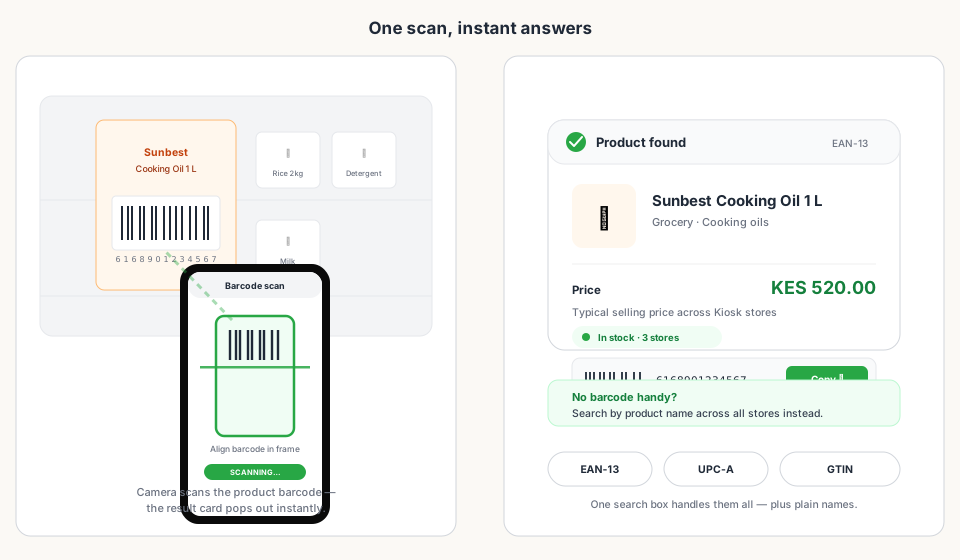
When you scan a barcode at a till, the till doesn't 'see' the product — it sees a number, then looks that number up. That lookup is exactly what kiosk.ke/barcode does in your browser, for free: point your camera or type the digits, and the number becomes a product.
2. Anatomy of an EAN-13: Kenya's 616 Prefix
The most common barcode on Kenyan shelves is EAN-13 — 13 digits that follow a global standard run by GS1. The structure isn't random; every group of digits means something, and the first three are the most fun: they reveal where the product's barcode was registered.
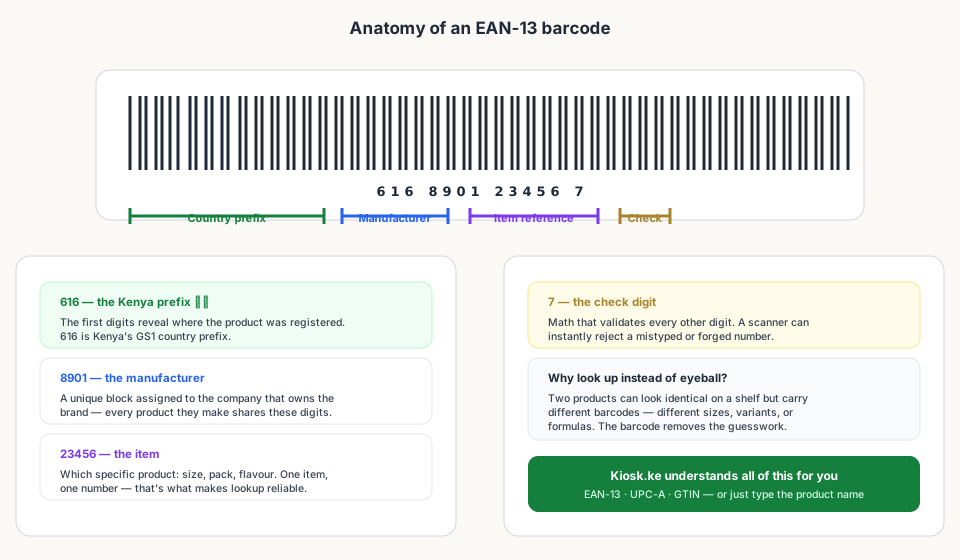
- 616 — Kenya's GS1 country prefix. Barcodes registered through GS1 Kenya start with these digits.
- Manufacturer block — the digits that identify the company behind the brand.
- Item reference — which specific product: size, pack, and variant.
- Check digit — built-in math that lets a scanner reject mistyped or counterfeit-looking numbers.
3. Barcode Formats You'll Meet in Kenya
| Format | Digits | Where you'll see it |
|---|---|---|
| EAN-13 | 13 | Everyday packaged goods — groceries, toiletries, household items. The default on Kenyan shelves. |
| UPC-A | 12 | Mostly imported goods from North America; a 13-digit EAN can be derived from it. |
| EAN-8 | 8 | Small packages where 13 digits won't fit — chewing gum, small sachets. |
| GTIN-14 / ITF-14 | 14 | Cases and cartons used in wholesale and distribution — the box of 24, not the single item. |
4. How to Look Up a Barcode in Kenya
Open kiosk.ke/barcode on any phone. The search box auto-detects what you're doing: digits only? It treats them as a barcode and looks them up. Words? It searches product names. Either way, you get the same result card — product, typical price, and stock.
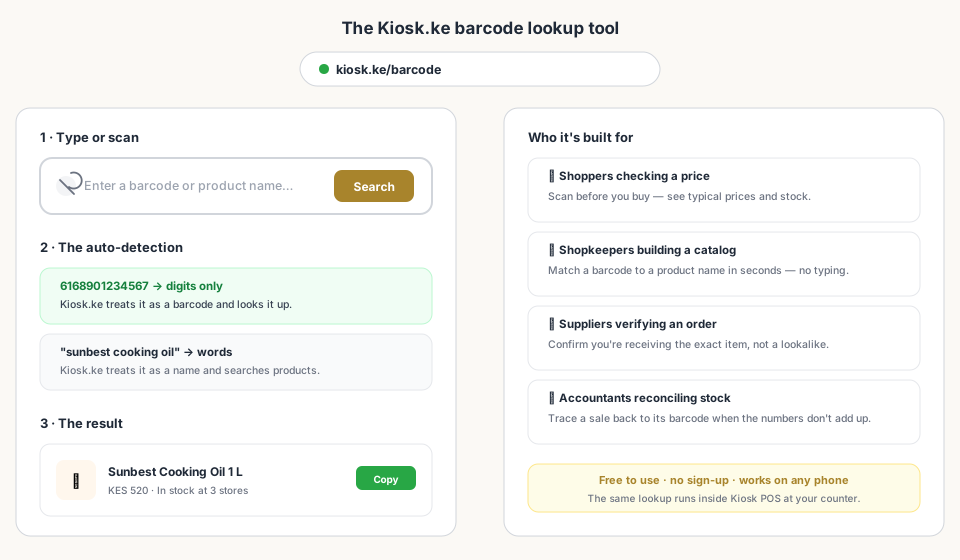
- Shoppers — check a typical price before you pay, and see stock before you travel to a store.
- Shopkeepers — match a barcode to a product name while building your catalog, without typing.
- Suppliers — confirm the exact item in an order instead of trusting a lookalike package.
- Anyone with a shelf of unlabeled stock — scan the package and learn what you're actually holding.
5. Know Before You Pay: Why Lookup Beats Guessing
Here's the scenario: the same bottle of cooking oil sits on three shelves in the same estate at three different prices. Which one is fair? Without identifying the product precisely, you're comparing names and hoping they mean the same thing. With a barcode, there's no hoping — the number is the same, so the comparison is honest.
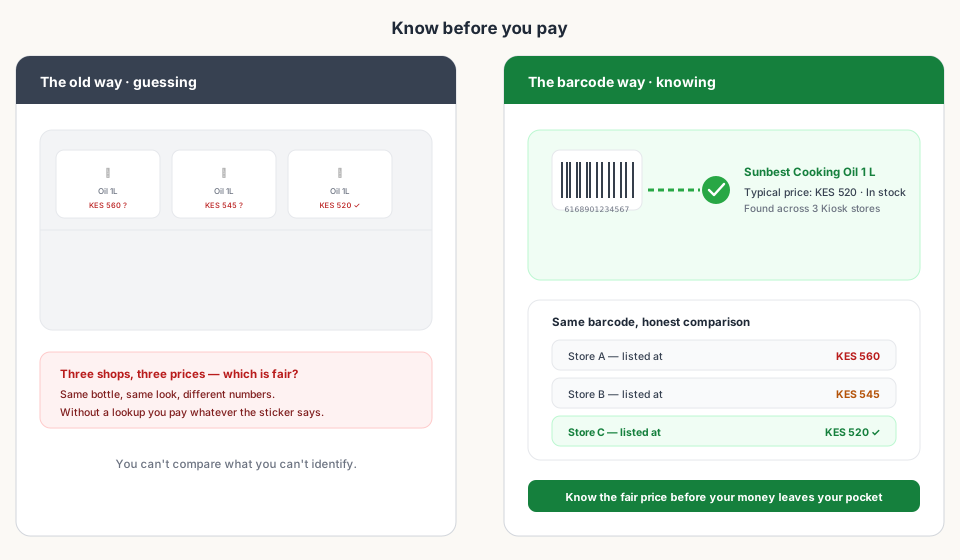
That's the quiet superpower of barcode lookup: it removes the ambiguity from shopping. Once you know the exact item, prices become comparable, stock becomes verifiable, and the checkout line stops being a place where surprises happen.
6. Barcodes at Your Own Counter
If you run a shop, barcodes aren't just for checking prices — they're how your till stays honest. Every scan at checkout updates stock automatically, prices are always the ones you set, and 'missing barcodes' stops being a mystery because you can see exactly which items still need one.
- Faster checkout — a scan takes a second; typing a name takes ten.
- Honest stock — every sale decrements the shelf, in real time.
- Cleaner catalog — one barcode per product means no duplicate entries for the same item.
- Better supplier orders — order by barcode, receive by barcode, and the two always match.
Bottom Line
Read next:
- Try the Barcode Lookup Toolkiosk.ke/barcode — free product search by barcode or name, no sign-up.
- Set Up a POS in Kenya in 30 MinutesYour till, storefront, M-Pesa, and eTIMS live the same afternoon.
- What Hardware Do You Actually Need?Phone, scanner, printer — the only kit a Kenyan counter really needs.
- Online + Physical: One InventoryOne stock count across your web shop and your counter.
- Top 10 POS Systems in Kenya (2026)The ranking that compares Kenya's POS platforms on M-Pesa, eTIMS, and fit.
Frequently asked questions
How do I look up a barcode in Kenya?
Open kiosk.ke/barcode, type the barcode digits or scan them with your phone camera, and search. It's free, works on any phone, and needs no sign-up.
What is Kenya's barcode country prefix?
616. It's the GS1 country prefix assigned to Kenya, and it appears at the start of EAN-13 barcodes registered through GS1 Kenya.
Can I search for a product without a barcode?
Yes. The same search box handles product names — type 'cooking oil' or 'pishori rice' and Kiosk.ke searches product names across its store catalogue.
What does a barcode lookup show me?
The product name, a typical selling price, stock availability across Kiosk-powered stores, and a copyable barcode you can reuse in your own catalog.
Why do the same products cost different amounts in different shops?
Shopkeepers set their own prices based on where they buy stock and what their customers pay. A lookup shows you what's typical, so you can spot a fair price before you pay.
Is barcode lookup really free?
Yes — no sign-up, no app install, no limits. If you later want the same lookup inside a till at your counter, Kiosk POS includes barcode scanning as part of the product catalog.
More from this series
- Getting startedSet Up a POS in Kenya in 30 MinutesHow to set up a POS in Kenya in 30 minutes — create your account, add products, take M-Pesa payments, and stay eTIMS-ready with KRA. No IT project required.
- RankingsTop 10 POS Systems in Kenya (2026) — Ranked & ComparedBest POS systems in Kenya for 2026, ranked on setup speed, native M-Pesa, eTIMS readiness, and shop-floor fit. Compare Kiosk.ke, Odoo, SimbaPOS, Tiwi, and more.
- InventoryOnline + Physical: One Inventory (Stop Selling What You Don't Have)How a single stock count across your web shop and counter stops overselling, ghost stock, and late-night spreadsheet reconciliations.
- HardwareWhat Hardware Do You Actually Need for a POS in Kenya?Phone, scanner, printer — a no-nonsense hardware checklist for a Kenyan retail counter. Start with the phone you own, upgrade when the queue demands it.
- ComparisonWhy Kiosk.ke Beats Odoo for Kenyan ShopsOdoo is a powerful ERP, but for a Kenyan shop, Kiosk.ke wins. Native M-Pesa, a live storefront, and one inventory — live in minutes, not months.
Ready for a POS built for Kenya?
Start free on Kiosk.ke — barcode POS, native M-Pesa STK, offline sales, and an online storefront from one stock count.