
Series 03
Kiosk vs Odoo
Series 03
Kiosk vs Odoo
Hardware
What Hardware Do You Actually Need for a POS in Kenya?
Phone, scanner, printer — a no-nonsense hardware checklist for a Kenyan retail counter. Start with the phone you own, upgrade when the queue demands it.
Updated 24 August 2026 · Kiosk
Walk into the wrong POS conversation and you'll hear about terminal walls, kitchen displays, and drawers of proprietary hardware. Walk into a Kenyan shop and you'll see the truth: a phone on the counter, a customer's phone paying, and the whole business running on the screen in someone's hand. This guide is the honest version — what hardware you actually need, in the order you actually need it.
1. The Till: a Phone or Tablet (You Already Have One)
The software is the POS; your phone is the counter. A phone or tablet runs the cashier, scans barcodes with its camera, sends M-Pesa STK pushes, and keeps selling — even when the network drops, with cash sales that sync when you reconnect.
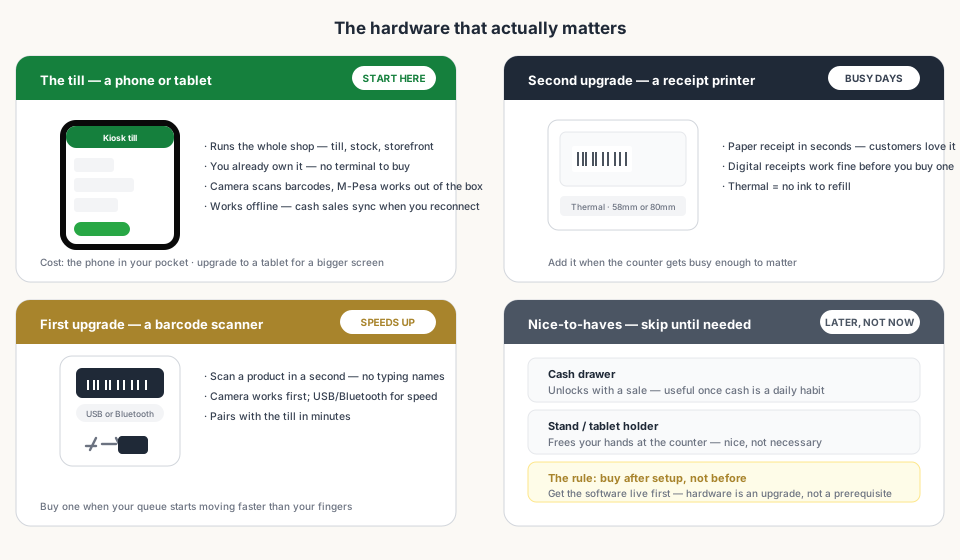
A tablet is a genuine comfort upgrade (bigger tiles, easier for two people to watch), but it's optional. Start with what's in your pocket; move to a tablet when the counter becomes a permanent station.
2. First Upgrade: a Barcode Scanner
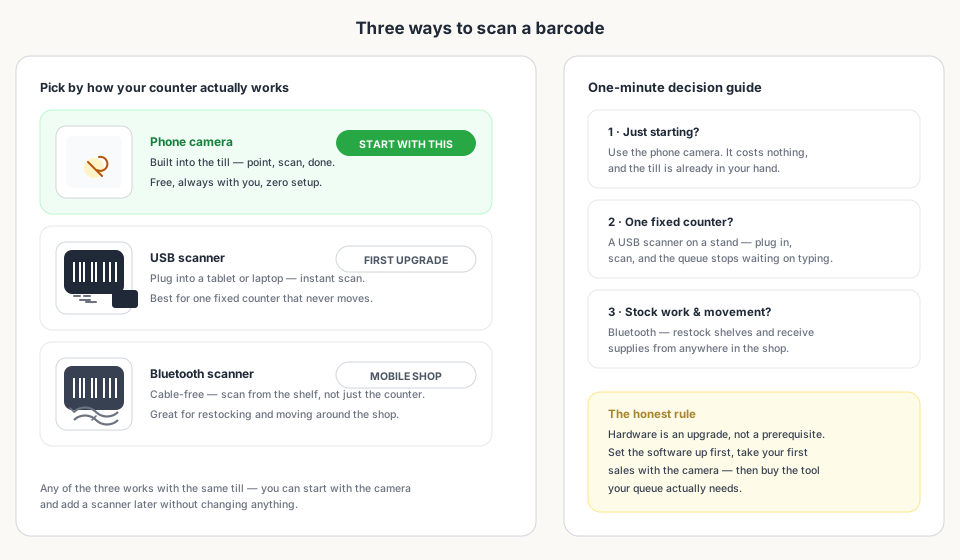
Scanning beats typing at the till — a scan takes a second; a name takes ten. The good news is you already own the first scanner: your phone's camera. The second step is a dedicated scanner, and there are three flavours:
| Option | Best for | Why |
|---|---|---|
| Phone camera | Every new shop | Free, built in, always with you — point and scan. |
| USB scanner | One fixed counter | Plug in and scan instantly — the queue stops waiting on typing. |
| Bluetooth scanner | Shops that move | Cable-free scanning while restocking or receiving supplies. |
3. Second Upgrade: a Receipt Printer
Digital receipts work from day one — shared on WhatsApp or shown on screen. A thermal receipt printer is the upgrade for busy counters where customers expect paper in hand. 'Thermal' is the word that matters: it prints without ink, so there's no cartridge to refill and no smudging.
Most shops do fine with a compact 58mm or 80mm thermal printer that pairs with the till over Bluetooth or USB.
4. Nice-to-Haves (Skip Until You Need Them)
- Cash drawer — unlocks with a sale; useful once cash handling is a daily routine.
- Stand or tablet holder — frees your hands at the counter; nice, not necessary.
- Label printer — only when you start printing shelf labels for a big catalogue.
- Second screen or kitchen display — irrelevant until you have a dedicated kitchen or busy deli counter.
5. The Budget Reality
| Item | Typical cost | Worth it? |
|---|---|---|
| Phone / tablet (yours) | KSh 0 | The whole till — this is where you start. |
| Phone camera scanning | Free | Built in — use it first. |
| USB scanner | Modest one-time cost | Yes, once the counter is fixed and busy. |
| Bluetooth scanner | Slightly more than USB | Yes, if you restock or receive away from the till. |
| Thermal receipt printer | Modest one-time cost | Yes, once customers expect paper receipts. |
| Cash drawer | Cheap add-on | Only once cash is a daily habit. |
6. The Mistake to Avoid: Buying Before Setup
The most common hardware mistake isn't buying the wrong scanner — it's buying anything at all before the software is live. Set up the till, add your products, take your first sales with the camera. Then watch your actual counter: if the queue waits on typing, buy a scanner. If customers ask for paper, buy a printer. Let the shop tell you what it needs.
Bottom Line
Read next:
- Set Up a POS in Kenya in 30 MinutesGet your till live the same afternoon — no hardware required to start.
- Why M-Pesa Integration MattersNative mobile money at the till — one tap, auto-credited.
- Barcode Search in Kenya: Look Up Any ProductKnow what's on the shelf before you ring it up.
- Why Kiosk.ke Beats Odoo for Kenyan ShopsA turnkey till on your phone versus a months-long ERP setup.
- Scan barcodes at the till (Help Center)USB, Bluetooth, or camera scanning — the detailed walkthrough.
Frequently asked questions
Do I need a computer or a dedicated POS terminal?
No. A phone or tablet is the whole till — it runs the cashier, tracks stock, and takes M-Pesa. A dedicated terminal is an upgrade, not a requirement.
Which barcode scanner should I buy?
Start with the phone camera — it's free and built in. Add a USB scanner for a fixed counter, or a Bluetooth scanner if you move around the shop (restocking, receiving supplies).
Do I need a receipt printer?
Not to start — digital receipts work from day one. When the counter gets busy and customers expect paper, a thermal printer (no ink) is the right add-on.
Can I use the POS with only my phone?
Yes, completely. Phone-only setups are the norm for most new shops: the camera scans, M-Pesa is built in, and offline cash sales sync when the network returns.
How much should I spend on POS hardware?
As little as KSh 0 to start — the phone in your pocket. A scanner and a thermal printer together are a modest one-time cost that pays off once your queue moves faster than your fingers.
Should I buy hardware before or after setup?
After. Set up the software first, take your first sales with the camera, and only then buy the tools your actual counter needs. Hardware is an upgrade, not a prerequisite.
Related articles
- ComparisonChoosing the Right POS for Your Business: Kiosk.ke vs. OdooA clear guide to deciding between Kiosk.ke — a turnkey local retail POS — and Odoo, a full enterprise ERP suite. Compare setup time, payments, and who each platform fits.
- Getting startedSet Up a POS in Kenya in 30 MinutesHow to set up a POS in Kenya in 30 minutes — create your account, add products, take M-Pesa payments, and stay eTIMS-ready with KRA. No IT project required.
- PaymentsWhy M-Pesa Integration Matters (and What 'Native' Really Means)In Kenya, mobile money is how customers pay. What native M-Pesa at the till means — STK Push in one tap, auto-credited sales, and a shift that balances itself.
- ComparisonWhy Kiosk.ke Beats Odoo for Kenyan ShopsOdoo is a powerful ERP, but for a Kenyan shop, Kiosk.ke wins. Native M-Pesa, a live storefront, and one inventory — live in minutes, not months.
- RankingsTop 10 POS Systems in Kenya (2026) — Ranked & ComparedBest POS systems in Kenya for 2026, ranked on setup speed, native M-Pesa, eTIMS readiness, and shop-floor fit. Compare Kiosk.ke, Odoo, SimbaPOS, Tiwi, and more.
- GuidesBarcode Search in Kenya: Look Up Any Product by Barcode or NameLook up any product by barcode or name in Kenya — EAN-13, UPC, GTIN. Check prices and stock across Kiosk stores with the free kiosk.ke barcode search.
Ready for a POS built for Kenya?
Start free on Kiosk.ke — barcode POS, native M-Pesa STK, offline sales, and an online storefront from one stock count.