
Series 03
Kiosk vs Odoo
Series 03
Kiosk vs Odoo
Comparison
ERP vs. POS: Do You Need the Full Suite?
An ERP can run your whole company. A POS needs to run your counter. Knowing which problem you have today saves months of implementation.
Updated 24 August 2026 · Kiosk
Two letters cause more overbuying than any brochure: ERP. Enterprise Resource Planning sounds like the grown-up choice — the full suite, every module, one system for everything. And for some businesses, it genuinely is. The problem is that 'some businesses' is a much shorter list than the software sales calls suggest, and the cost of buying too early is measured in months, not shillings.
1. What the Words Actually Mean
A point-of-sale system is built around one act: the sale. It handles the till, payments, receipts, and the stock that every sale touches. An enterprise resource planning system is built around the whole organisation: it connects sales to accounting, inventory to purchasing, people to payroll, and factories to warehouses.
| Question | POS answers it | ERP answers it |
|---|---|---|
| The till | Ring sales, take M-Pesa, print receipts — in minutes | One module among many; configure first |
| Payments | Native M-Pesa STK, auto-credited | Third-party payment modules, credentials, setup |
| Stock | One count across counter, web, and supplies | Multi-warehouse logistics, transfers, BOMs |
| People | Roles and PINs for your team | Full HR: payroll, shifts, statutory filings |
| Money | Sales reports and honest margins | Double-entry accounting for auditors and lenders |
| Setup | Minutes, self-serve, from your phone | Weeks to months, with implementation help |
2. Two Different Jobs, Two Different Tools
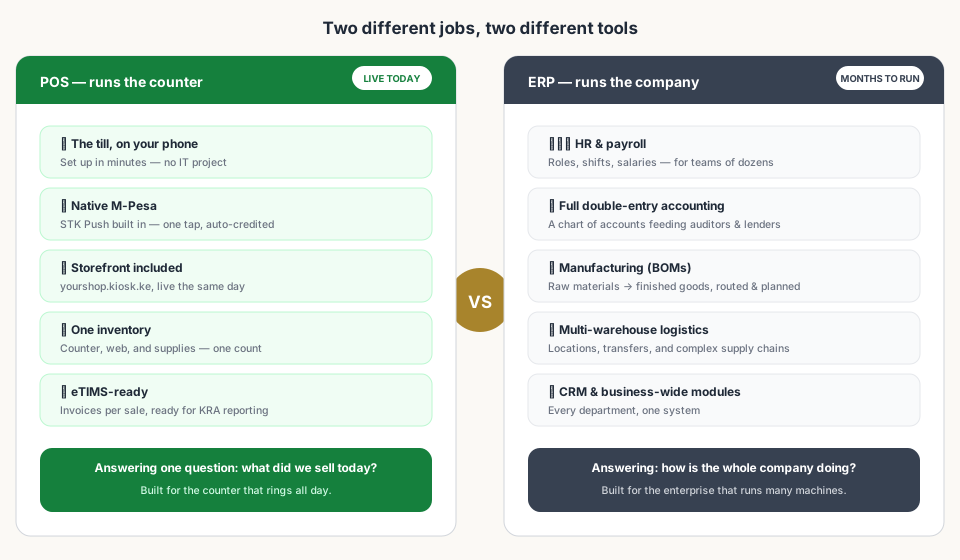
Neither tool is better in the abstract — they're built for different sizes of problem. The POS is fast because it only worries about the counter. The ERP is powerful because it worries about everything. Buying the powerful one before you have 'everything' means paying for machinery you don't have yet.
3. Where the Full Suite Genuinely Earns Its Keep
- Manufacturing — bills of materials, routing, and production planning are world-class in the big suites.
- Multi-warehouse logistics — inventory across locations, transfers, and complex supply chains.
- HR & payroll — roles, shifts, and salaries for teams of dozens or hundreds.
- Full financial depth — a double-entry chart of accounts that auditors and lenders recognise.
- CRM and business-wide reporting — every department in one system.
4. The Cost of the Full Suite
The price of an ERP isn't just the licence. It's the per-module and per-user fees that grow as you switch things on, and it's the implementation itself — weeks of configuration, data migration, and training while the counter keeps selling on whatever you had before. Even 'free' open-source suites charge that tax in setup hours and maintenance.
5. The Five-Question Readiness Test
Forget the marketing — answer five questions about your business as it is today:
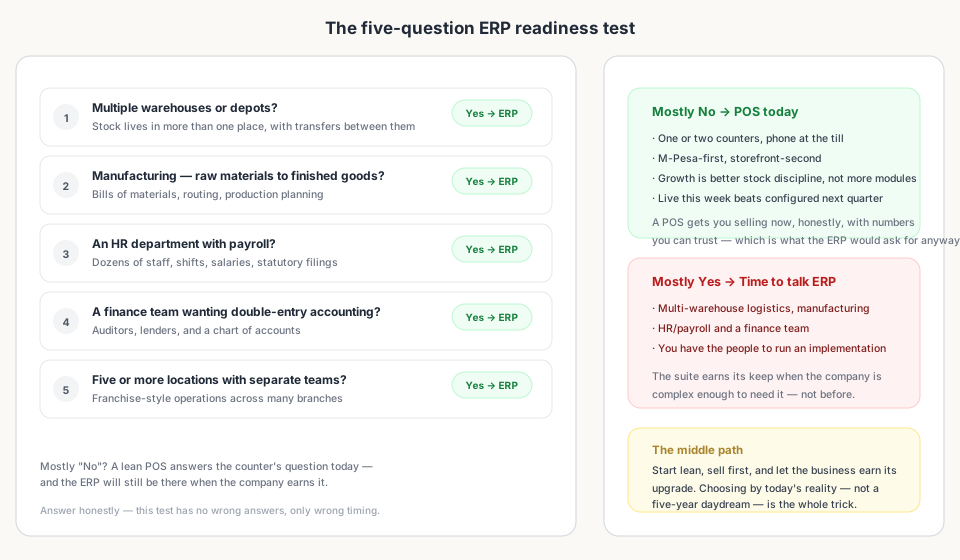
- Multiple warehouses or depots with stock transfers between them?
- Manufacturing — raw materials turning into finished goods?
- An HR department running payroll for dozens of staff?
- A finance team that wants double-entry accounting for auditors?
- Five or more locations, each with its own team?
Mostly 'no' means the counter's question is the one you have today — and a lean POS answers it honestly, with numbers an ERP would respect anyway. Mostly 'yes' means the complexity is real, and the full suite is the right tool for it.
6. The Middle Path
The smartest route for most growing shops is chronological: start lean, sell first, and let the business earn its upgrade. The data habits you build on a good POS — ringing every sale, one honest inventory, clean prices — are exactly the data a future ERP needs to import. And the ERP will still be there. Suites don't disappear; they wait.
Bottom Line
Read next:
- Choosing the Right POS: Kiosk.ke vs. OdooThe balanced pillar guide this argument is built on.
- Why Kiosk.ke Beats Odoo for Kenyan ShopsThe opinionated case for a turnkey till over a months-long ERP setup.
- Set Up a POS in Kenya in 30 MinutesGet the till live the same afternoon — no IT project required.
- How to Grow a Mini-Mart in KenyaThe systems that scale a shop — without reaching for an ERP.
- Top 10 POS Systems in Kenya (2026)Where every platform lands on setup speed, M-Pesa, and fit.
Frequently asked questions
What's the difference between a POS and an ERP?
A POS runs the counter: sales, payments, stock, receipts. An ERP runs the company: HR, accounting, manufacturing, multi-warehouse logistics, and CRM. One answers 'what did we sell today?'; the other answers 'how is the whole business doing?'
Do I need an ERP for a small shop in Kenya?
Usually not. A lean POS with native M-Pesa, a storefront, and honest stock control covers the counter's needs for most single-branch shops. The ERP earns its keep when you add warehouses, manufacturing, or an HR and finance team.
When should I upgrade from a POS to an ERP?
When the business is complex enough to need it: multiple warehouses with transfers, manufacturing with bills of materials, dozens of staff on payroll, or a finance team wanting double-entry accounting. If none of those are true today, the upgrade can wait.
Is an ERP more expensive than a POS?
Generally yes — per-module and per-user fees add up, and implementation takes weeks to months. The real cost is often the setup itself: weeks of configuration while the counter keeps selling with whatever you have. 'Free' suites still bill you in setup hours.
Can I move from a POS to an ERP later?
Yes, and it's easier if you start with honest records. A POS that tracks real stock, prices, and sales gives an ERP clean data to import. The habits you build — ringing every sale, keeping one inventory — travel well into any bigger system.
How do I know which one I need today?
Run the five-question test: multiple warehouses? Manufacturing? HR with payroll? A finance team? Five-plus locations with separate teams? Mostly 'no' means a lean POS answers today's question — and the ERP will still be there when the business earns it.
Related articles
- ComparisonChoosing the Right POS for Your Business: Kiosk.ke vs. OdooA clear guide to deciding between Kiosk.ke — a turnkey local retail POS — and Odoo, a full enterprise ERP suite. Compare setup time, payments, and who each platform fits.
- ComparisonWhy Kiosk.ke Beats Odoo for Kenyan ShopsOdoo is a powerful ERP, but for a Kenyan shop, Kiosk.ke wins. Native M-Pesa, a live storefront, and one inventory — live in minutes, not months.
- Getting startedSet Up a POS in Kenya in 30 MinutesHow to set up a POS in Kenya in 30 minutes — create your account, add products, take M-Pesa payments, and stay eTIMS-ready with KRA. No IT project required.
- RankingsTop 10 POS Systems in Kenya (2026) — Ranked & ComparedBest POS systems in Kenya for 2026, ranked on setup speed, native M-Pesa, eTIMS readiness, and shop-floor fit. Compare Kiosk.ke, Odoo, SimbaPOS, Tiwi, and more.
- GrowthHow to Grow a Mini-Mart in Kenya: From One Shop to a Real BusinessPractical steps to move a Kenyan mini-mart from surviving to scaling — compliance, stock control, M-Pesa, digital presence, reinvestment, and knowing when to open a second branch.
Ready for a POS built for Kenya?
Start free on Kiosk.ke — barcode POS, native M-Pesa STK, offline sales, and an online storefront from one stock count.