
Series 03
Kiosk vs Odoo
Series 03
Kiosk vs Odoo
Payments
Why M-Pesa Integration Matters (and What 'Native' Really Means)
In Kenya, mobile money is how customers pay. What native M-Pesa at the till means — STK Push in one tap, auto-credited sales, and a shift that balances itself.
Updated 24 August 2026 · Kiosk
Walk into any Kenyan shop and watch what happens at the counter: the customer gets a message on their phone, types a PIN, and the sale is done. Mobile money isn't a payment option in Kenya — it's how customers pay. That one fact decides which POS systems work at a Kenyan counter and which ones just tolerate it.
1. M-Pesa Is Not a Feature — It's the Till
Software built in Nairobi knows something software built in Brussels or San Francisco often learns too late: roughly nine out of ten till transactions at a Kenyan counter involve mobile money. A POS that treats M-Pesa as an afterthought adds a step to every sale — and a step on every sale is a queue, a lost sale, or a nightly reconciliation headache.
That's why the best POS rankings for Kenya score 'native M-Pesa' as a first-class criterion, not a nice-to-have. It's the difference between the till doing the payment for you and you doing the payment around the till.
2. What Native STK Actually Looks Like
STK Push — the payment prompt that lands on a customer's phone — is how mobile money works in person. Native integration means the till sends it, and the sale completes itself when the customer confirms:
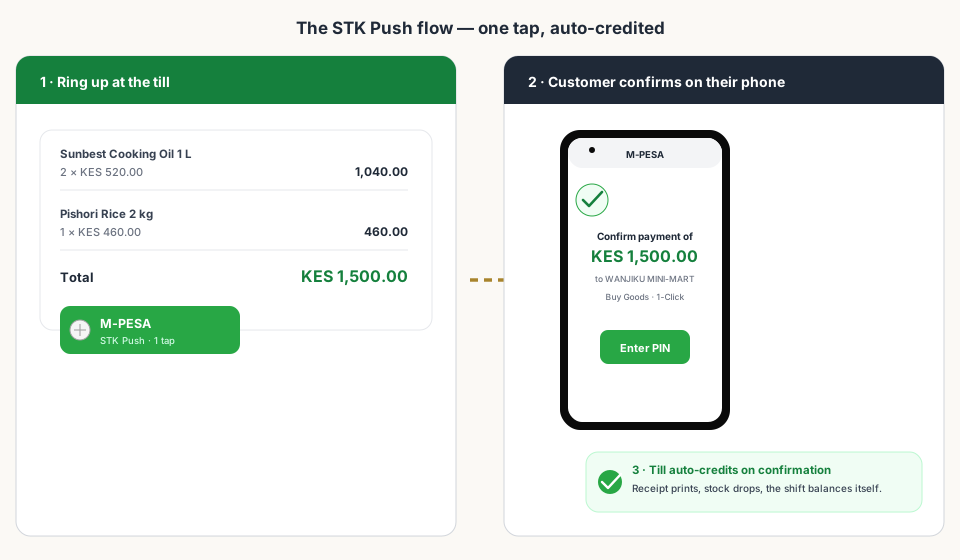
- Ring the sale — the cart shows the total, the cashier taps M-Pesa.
- STK Push is sent instantly to the customer's phone — no typing their number twice, no separate payment app.
- The customer confirms the amount and enters their PIN on their own phone.
- The till auto-credits on confirmation — receipt, stock update, and payment record in one motion.
3. The Other Way: Bolted-On Payments
Some POS systems — especially global ones — accept M-Pesa only through a third-party payment module. That means installing a plugin, registering for gateway credentials, configuring sandbox keys, and testing. And it doesn't end at setup: the module usually carries a subscription, and every platform update risks breaking it.
4. A Real Shift, Auto-Reconciled
Here's what a busy day actually looks like when payments are native: cash sales, M-Pesa sales, and split payments all land in the same till record. At close, the drawer totals itself — cash here, M-Pesa there, and they add up to the day's sales with nothing left to match by hand.
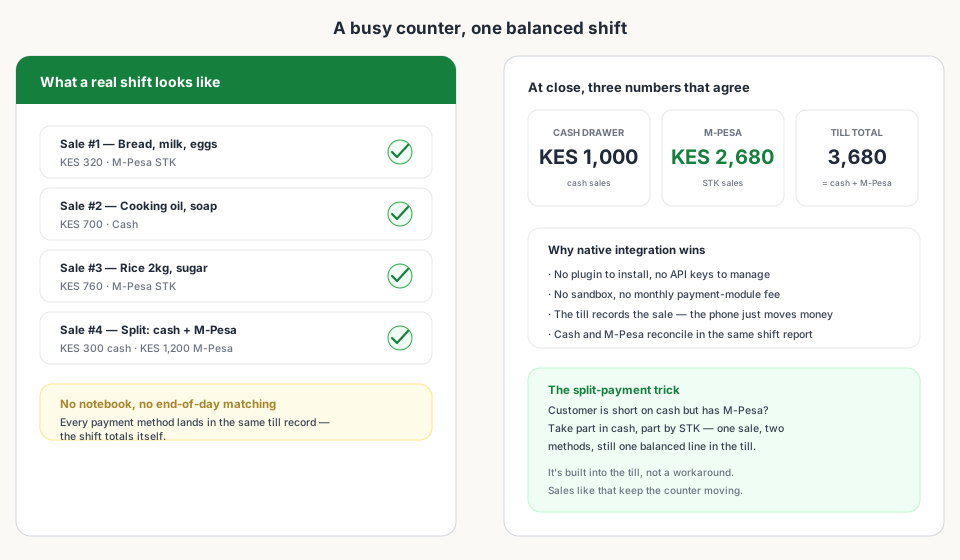
- Cash and M-Pesa live in the same sale record — no separate logs to merge.
- Split payments (part cash, part STK) are one sale with two lines, not two half-sales.
- The shift report totals everything; the M-Pesa float matches what hit your account.
5. What to Look for in Any POS
- Native STK Push from the till — not a redirect to a separate payment screen.
- Auto-credit on confirmation — the sale closes itself when the customer enters their PIN.
- Split payments built in — cash plus M-Pesa on one sale.
- Settlement in your shift reports — M-Pesa reconciles like cash, not like a mystery.
- No per-payment module fees — native payments don't charge you a monthly plugin subscription.
Bottom Line
Read next:
- Set Up a POS in Kenya in 30 MinutesTill, storefront, M-Pesa, and eTIMS live the same afternoon.
- Why Kiosk.ke Beats Odoo for Kenyan ShopsNative M-Pesa versus bolted-on payment modules, in detail.
- Top 10 POS Systems in Kenya (2026)Ranked on native M-Pesa, eTIMS readiness, and shop-floor fit.
- What Hardware Do You Actually Need?Phone, scanner, printer — the only kit a Kenyan counter needs.
- Choosing the Right POS: Kiosk.ke vs. OdooThe balanced guide to picking the platform that fits your business.
Frequently asked questions
What does 'native' M-Pesa mean at a POS?
It means M-Pesa is built into the till itself: you ring the sale, tap M-Pesa, and an STK Push goes straight to the customer's phone. No plugin to install, no API keys to manage, no third-party payment module with its own bill.
How does a customer pay with M-Pesa at the till?
The cashier rings up the sale and taps M-Pesa. The till sends an STK Push to the customer's phone, they confirm the amount and enter their PIN, and the sale auto-completes — the receipt prints and stock updates without any extra steps.
Do I need a separate M-Pesa device or terminal?
No. The till runs on the same phone or tablet you use for everything else, and the customer confirms the payment on their own phone. No extra hardware, no extra float to manage.
Can a customer split a payment between cash and M-Pesa?
Yes — split payments are built in. If a customer is short on cash but has M-Pesa, take part in cash and the rest by STK. It stays one sale with two payment lines, and the shift still balances itself.
How do M-Pesa sales reconcile at the end of the day?
M-Pesa and cash land in the same till record, so the shift report totals both automatically — no notebook, no late-night matching of phone messages against the day's sales.
Is M-Pesa included in the free plan?
Yes. Kiosk.ke starts free — 300 products and one cashier — with M-Pesa and a storefront included, so native mobile money works from your very first ring.
Related articles
- ComparisonChoosing the Right POS for Your Business: Kiosk.ke vs. OdooA clear guide to deciding between Kiosk.ke — a turnkey local retail POS — and Odoo, a full enterprise ERP suite. Compare setup time, payments, and who each platform fits.
- Getting startedSet Up a POS in Kenya in 30 MinutesHow to set up a POS in Kenya in 30 minutes — create your account, add products, take M-Pesa payments, and stay eTIMS-ready with KRA. No IT project required.
- HardwareWhat Hardware Do You Actually Need for a POS in Kenya?Phone, scanner, printer — a no-nonsense hardware checklist for a Kenyan retail counter. Start with the phone you own, upgrade when the queue demands it.
- RankingsTop 10 POS Systems in Kenya (2026) — Ranked & ComparedBest POS systems in Kenya for 2026, ranked on setup speed, native M-Pesa, eTIMS readiness, and shop-floor fit. Compare Kiosk.ke, Odoo, SimbaPOS, Tiwi, and more.
- ComparisonWhy Kiosk.ke Beats Odoo for Kenyan ShopsOdoo is a powerful ERP, but for a Kenyan shop, Kiosk.ke wins. Native M-Pesa, a live storefront, and one inventory — live in minutes, not months.
Ready for a POS built for Kenya?
Start free on Kiosk.ke — barcode POS, native M-Pesa STK, offline sales, and an online storefront from one stock count.