
Series 03
Kiosk vs Odoo
Series 03
Kiosk vs Odoo
Getting started
Set Up a POS in Kenya in 30 Minutes
How to set up a POS in Kenya in 30 minutes — create your account, add products, take M-Pesa payments, and stay eTIMS-ready with KRA. No IT project required.
Updated 24 August 2026 · Kiosk
Setting up a POS in Kenya shouldn't feel like an IT project. A modern till needs to do four things for a Kenyan shop — record sales, accept M-Pesa, keep stock honest, and stay aligned with KRA reporting. This guide walks through all four, step by step, and shows you exactly what each screen looks like.
1. What You Need Before You Start
- A phone or tablet — the till lives on the device you already carry.
- Your KRA PIN — you'll need it for tax compliance and invoicing.
- A product list with prices — start with your 20 best sellers, not the whole shelf.
- A phone number for M-Pesa — this is how customers will pay you.
- About 30 quiet minutes — that's the whole appointment.
That's it. You do not need a computer, a dedicated terminal, or a wall of hardware. The software is the POS; your phone is the counter.
2. Step 1 — Create Your Account
Sign up with your name, email, and a password. Kiosk.ke starts free — 300 products and one cashier — with M-Pesa and a storefront included, so you can get a real feel for the till before paying anything.
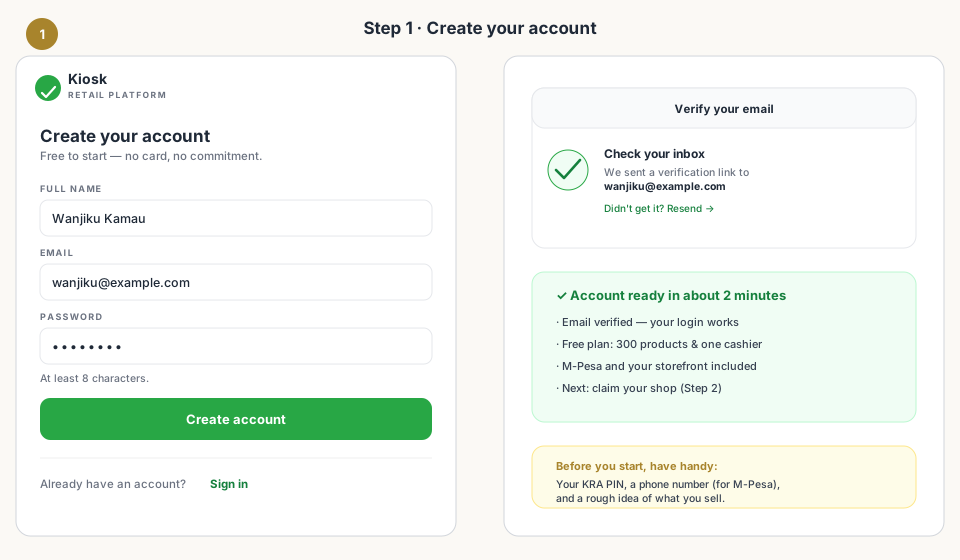
Check your inbox, tap the verification link, and the account is live. Have your KRA PIN and the phone number you use for M-Pesa nearby — they're needed in the next step.
3. Step 2 — Claim Your Shop & Storefront
Next you name your business, pick your type (grocery, pharmacy, boutique…), and claim your storefront address — something like yourshop.kiosk.ke. This URL is your shop's home on the internet, and it comes with every plan.
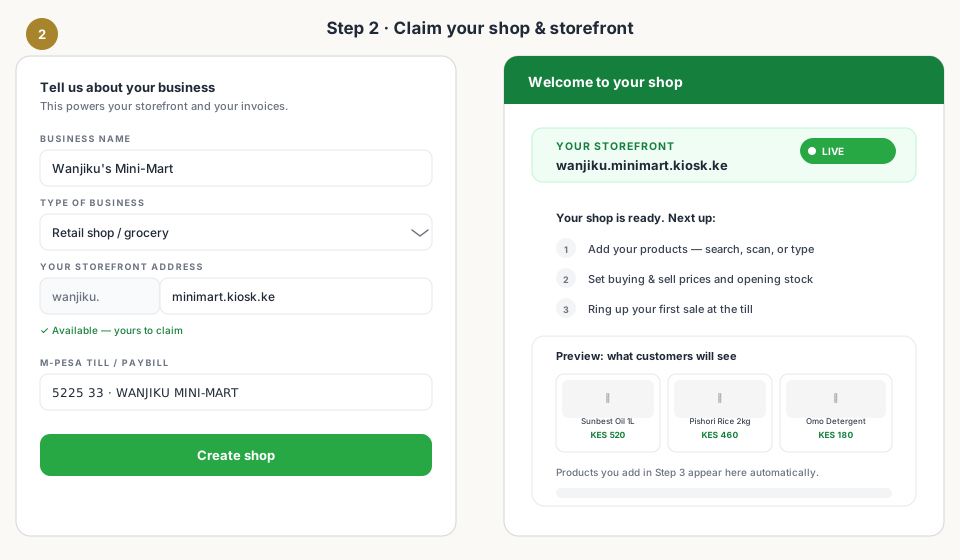
You'll also connect your M-Pesa details here. Once that's in, the shop is ready: a live storefront URL, an empty catalogue waiting for products, and a till that's seconds away from its first ring.
4. Step 3 — Add Your Products
This is the step that usually surprises people — because it's fast. Instead of typing every field from scratch, search the product name or scan the barcode. The global catalogue finds the item and pre-fills the details; you just confirm your prices and stock.
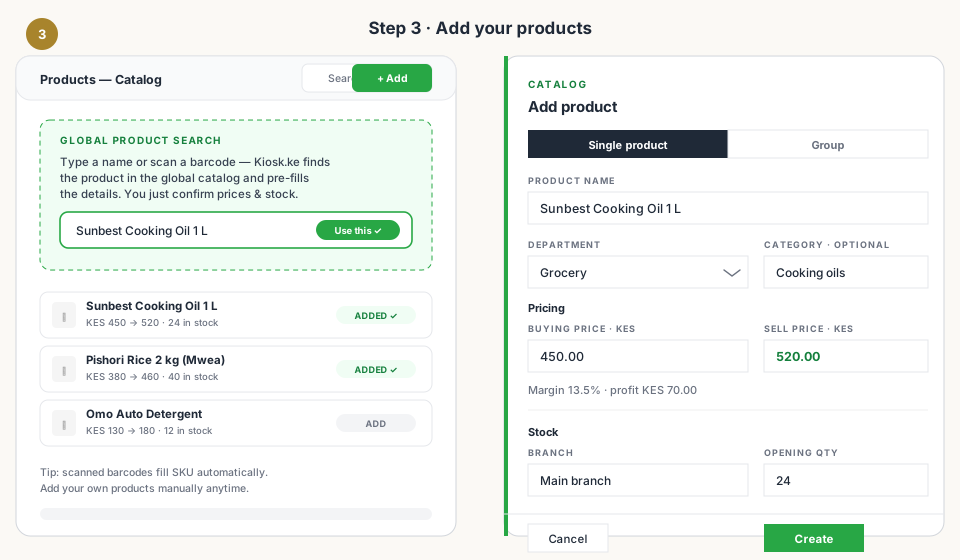
- Buying price — what you paid the supplier; the till uses it to show your margin.
- Sell price — what the customer pays; the difference is your profit per unit.
- Barcode — scan or type it; the SKU fills itself if you leave it blank.
- Opening quantity — what's on the shelf today; this is your stock baseline.
5. Step 4 — Take Your First Sale
Now the fun part. Tap through your till, add items to the cart, and take payment — cash or M-Pesa. With M-Pesa, one tap sends an STK Push to the customer's phone, and the sale auto-completes the moment they confirm their PIN.
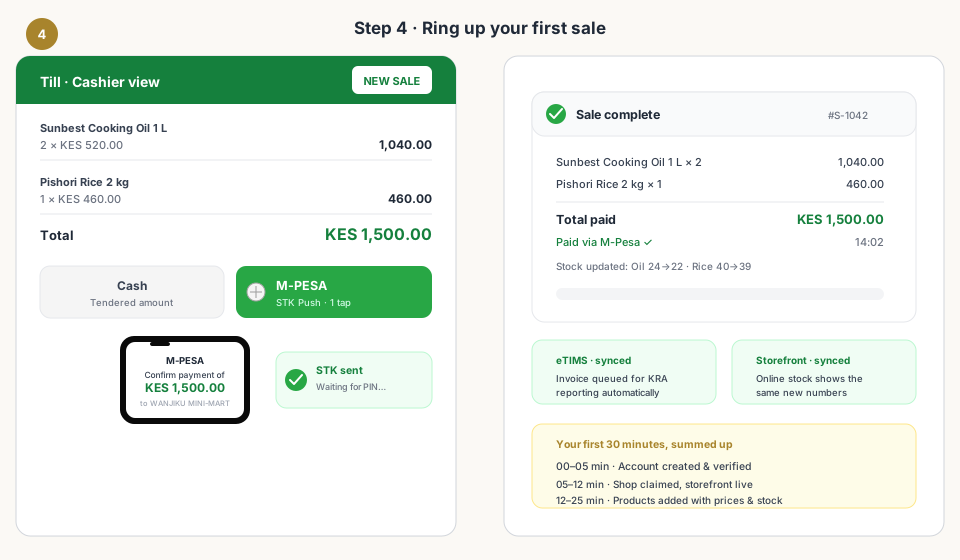
Watch what happens automatically: the stock count drops, the storefront shows the same new number, and the invoice is queued for tax reporting. That single shared stock count is what stops you from selling things you don't have.
6. Step 5 — Stay eTIMS-Ready with KRA
eTIMS — KRA's electronic tax invoice management system — is now part of doing business in Kenya. The painless way to stay compliant is software that does the record-keeping for you, not a notebook you reconstruct at month end.
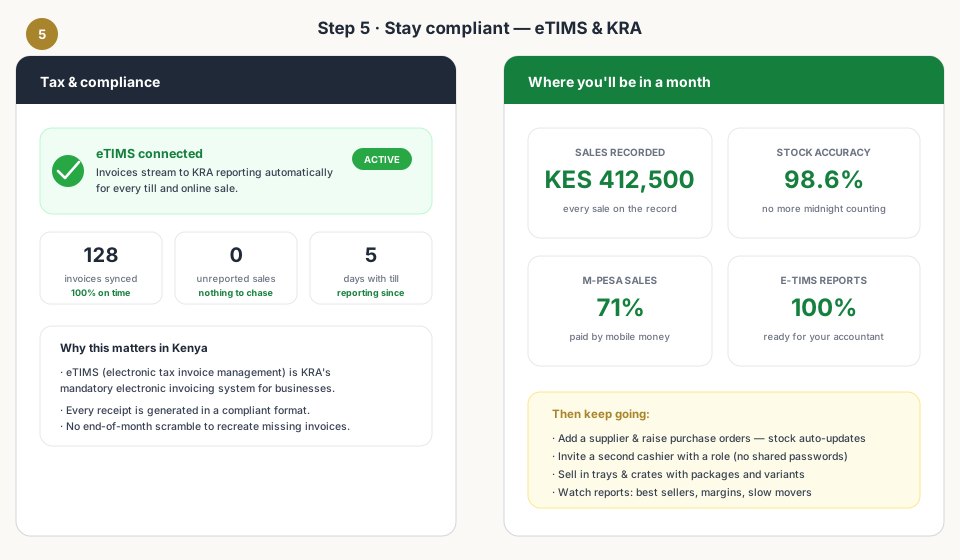
Kiosk.ke includes built-in tax reporting for day-to-day retail, so the invoice for every till and online sale is kept ready for eTIMS reporting. When your accountant asks for numbers, they're already there — accurate, dated, and reconciled with your stock.
7. Common Setup Mistakes to Avoid
- Trying to add the entire shelf on day one — your 20 best sellers cover 80% of sales; the rest can follow.
- Guessing sell prices — enter a real buying price so the margin column is honest.
- Mixing units — decide early whether rice sells by the kilo, the packet, or both, and stick to one for each product.
- Trusting a barcode scan blindly — glance at the picture and name; two products can share a digit.
- Waiting for 'the right time' — the right time is this afternoon, while your competitor's WhatsApp line is busy.
Read next:
- What Hardware Do You Actually Need?Phone, scanner, printer — the only kit a Kenyan counter really needs.
- Why M-Pesa Integration MattersWhy native mobile money beats bolted-on payment plugins.
- Online + Physical: One InventoryOne stock count across your web shop and your counter.
- Why Kiosk.ke Beats Odoo for Kenyan ShopsThe case for a turnkey till over a months-long ERP setup.
- Choosing the Right POS: Kiosk.ke vs. OdooThe balanced guide to picking the platform that fits your business.
Frequently asked questions
How much does it cost to set up a POS in Kenya?
Kiosk.ke starts free — 300 products and one cashier, with M-Pesa and a storefront included. Hardware is optional at first: most shops begin with a phone or tablet they already own, then add a scanner or receipt printer later.
Do I need special hardware or a dedicated machine?
No. A phone or tablet is enough to start — that's the whole point of a mobile-first till. If you later want a faster checkout, a barcode scanner and a receipt printer are the two upgrades that pay for themselves.
Is the POS eTIMS-compliant with KRA?
Kiosk.ke includes built-in tax reporting for day-to-day retail, so invoices generated at the till are kept ready for KRA eTIMS reporting. If eTIMS obligations apply to you, having that built in beats reconciling manually at month end.
How do I accept M-Pesa at the till?
M-Pesa is built in. Ring up the sale, tap M-Pesa, and the till sends an STK Push to the customer's phone — no gateway, API keys, or third-party plugin required. The till auto-credits the sale on confirmation.
Can I also sell online?
Yes. Claiming your shop also claims your storefront (yourshop.kiosk.ke). Products you add to the till appear online with the same stock count, so what's on the shelf is what's on the website.
How long does it really take?
Most shops are live the same afternoon. Account creation takes about two minutes, adding products another 10–20, and your first sale can happen the same hour. Thirty minutes is an honest promise for a modest product list.
Related articles
- ComparisonChoosing the Right POS for Your Business: Kiosk.ke vs. OdooA clear guide to deciding between Kiosk.ke — a turnkey local retail POS — and Odoo, a full enterprise ERP suite. Compare setup time, payments, and who each platform fits.
- HardwareWhat Hardware Do You Actually Need for a POS in Kenya?Phone, scanner, printer — a no-nonsense hardware checklist for a Kenyan retail counter. Start with the phone you own, upgrade when the queue demands it.
- PaymentsWhy M-Pesa Integration Matters (and What 'Native' Really Means)In Kenya, mobile money is how customers pay. What native M-Pesa at the till means — STK Push in one tap, auto-credited sales, and a shift that balances itself.
- InventoryOnline + Physical: One Inventory (Stop Selling What You Don't Have)How a single stock count across your web shop and counter stops overselling, ghost stock, and late-night spreadsheet reconciliations.
- ComparisonWhy Kiosk.ke Beats Odoo for Kenyan ShopsOdoo is a powerful ERP, but for a Kenyan shop, Kiosk.ke wins. Native M-Pesa, a live storefront, and one inventory — live in minutes, not months.
- Guides5 Signs You've Outgrown Your POSStock mismatches, slow checkouts, and spreadsheet workarounds — the clear signals it's time to upgrade your point of sale.
- Tax & complianceTaxes for Mini-Marts in Kenya: The Complete eTIMS & KRA GuideEverything a mini-mart owner in Kenya needs to know about tax — eTIMS, VAT, turnover tax, income tax, PAYE, excise, records, and penalties — and how the right till keeps it manageable.
Ready for a POS built for Kenya?
Start free on Kiosk.ke — barcode POS, native M-Pesa STK, offline sales, and an online storefront from one stock count.