
Series 03
Kiosk vs Odoo
Series 03
Kiosk vs Odoo
Guides
The Real Cost of 'Free' Software
Hidden fees, add-on modules, and implementation hours — what 'free' POS and ERP tools often cost in practice.
Updated 24 August 2026 · Kiosk
'Free' is a price, not a promise. Some of the most expensive software a Kenyan shop will ever run charges nothing on the invoice — and bills everything in payment-module fees, per-user charges, implementation weeks, and the quiet daily tax of a team fighting the tool. This guide is about the part of the bill that doesn't say 'invoice'.
1. The 'Free Software' Iceberg
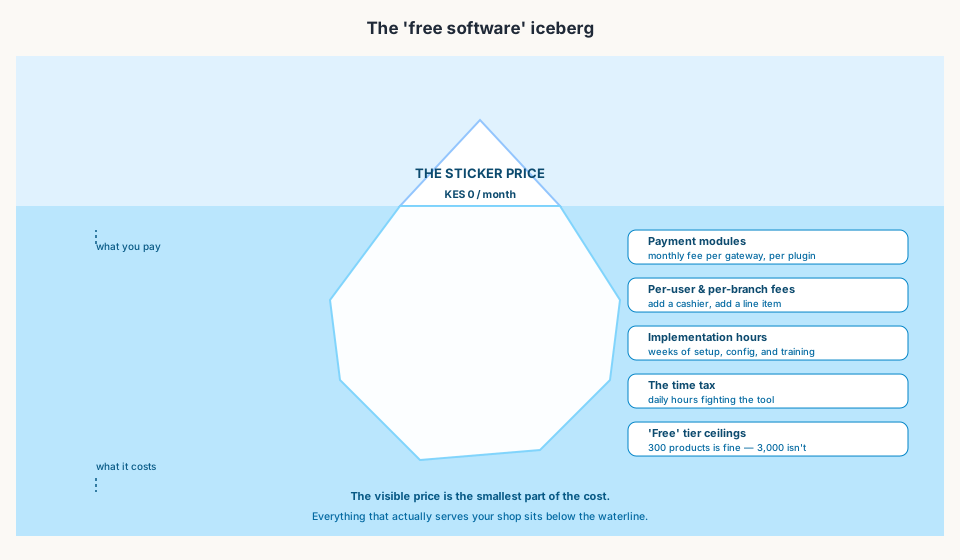
- Payment modules — a monthly fee per gateway or plugin, so accepting M-Pesa costs you even on a 'free' plan.
- Per-user and per-branch fees — add a cashier or a branch and the line item appears.
- Implementation hours — weeks of setup, configuration, and training before the first sale.
- The time tax — daily hours spent re-entering sales, fixing stock, and bridging gaps with extra apps.
- Free-tier ceilings — 300 products is generous until you have 3,000; the upgrade then prices the basics.
2. The Time Tax Is the Biggest Bill
Add up the invoices and the modules and you still won't find the largest cost. It's the ninety minutes every night that a till without native M-Pesa costs: ring the sale in one app, collect the money in another, copy the numbers into a third, and reconcile the differences by hand. It's the stock that never matches because the till and the spreadsheet disagree.
That's the time tax — and it compounds. A tool that adds work to every sale costs more in a year than most subscriptions, because it takes your team's hours, which are the one thing you can't buy back.
3. What 'Free' Should Actually Buy You
A fair free tier is a real product, not a tease. It should include the things a shop actually needs day one — because that's what 'try it without risk' means. The checklist before you trust any 'free' label:
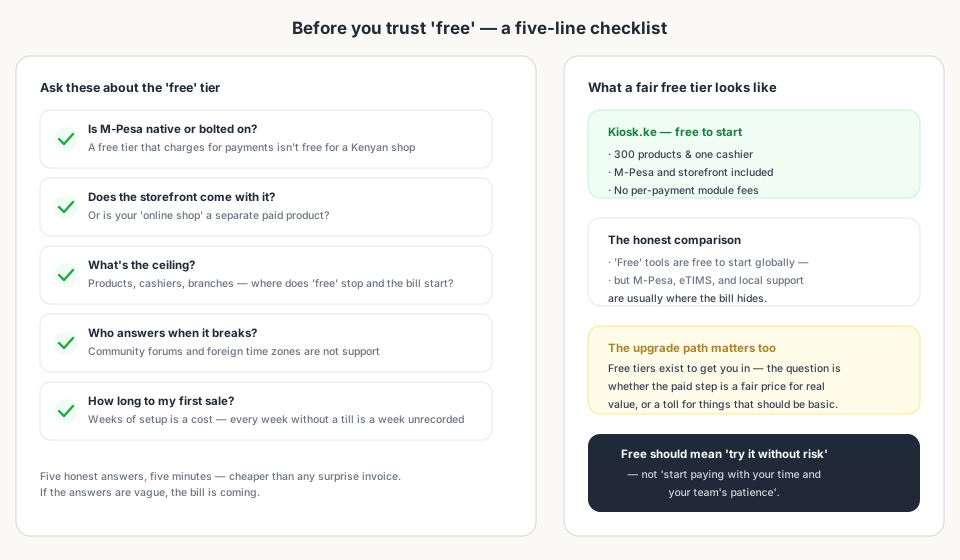
- Is M-Pesa native, or bolted on with fees?
- Does the storefront come with it, or is your 'online shop' a separate paid product?
- What's the ceiling — products, cashiers, branches?
- Who answers when it breaks — local support or a forum in another time zone?
- How long to your first sale — days or weeks?
4. The Free Tier Done Right
Kiosk.ke starts free — 300 products and one cashier — with M-Pesa and a storefront included rather than sold as add-ons. The paid step is for more capacity, not for basics: more products, more cashiers, branches. That's the shape of an honest free tier: real value now, a fair price for more later.
Bottom Line
Read next:
- ERP vs. POS: Do You Need the Full Suite?Where 'free' ERPs really bill you — in modules and implementation.
- 5 Signs You've Outgrown Your POSWhen the tool's true cost shows up as nightly homework.
- Why Kiosk.ke Beats Odoo for Kenyan ShopsThe cost of 'free' Odoo for a shop, in detail.
- Top 10 POS Systems in Kenya (2026)What each platform's free tier actually includes.
- Set Up a POS in Kenya in 30 MinutesLive the same afternoon — no implementation weeks to pay for.
Frequently asked questions
Is 'free' POS software actually free?
The sticker price is often KES 0, but the real cost hides below the waterline: payment module fees, per-user and per-branch charges, weeks of implementation, and the daily hours your team spends fighting the tool. Always check what the free tier excludes.
What's the biggest hidden cost of free software?
The time tax. A till your team has to work around — re-entering sales, fixing stock, bridging payments with extra apps — costs hours every single day. That's a bigger bill than any subscription.
Why do 'free' POS tools charge for M-Pesa?
Because they're built for markets where card payments dominate. In Kenya, mobile money is how customers pay — a free tier that charges per payment gateway or treats M-Pesa as an add-on isn't free for a Kenyan counter.
What should I check before trusting a free tier?
Five things: is M-Pesa native? Is the storefront included? What's the ceiling (products, cashiers, branches)? Who answers when it breaks? And how long to your first sale? Vague answers mean the bill is coming.
Is Kiosk.ke really free to start?
Yes — free to start with 300 products and one cashier, and M-Pesa plus your storefront are included rather than sold as add-ons. You can run a real till before paying anything, and the paid step is for more capacity, not for basics.
Related articles
- ComparisonChoosing the Right POS for Your Business: Kiosk.ke vs. OdooA clear guide to deciding between Kiosk.ke — a turnkey local retail POS — and Odoo, a full enterprise ERP suite. Compare setup time, payments, and who each platform fits.
- ComparisonERP vs. POS: Do You Need the Full Suite?An ERP can run your whole company. A POS needs to run your counter. Knowing which problem you have today saves months of implementation.
- Guides5 Signs You've Outgrown Your POSStock mismatches, slow checkouts, and spreadsheet workarounds — the clear signals it's time to upgrade your point of sale.
- RankingsTop 10 POS Systems in Kenya (2026) — Ranked & ComparedBest POS systems in Kenya for 2026, ranked on setup speed, native M-Pesa, eTIMS readiness, and shop-floor fit. Compare Kiosk.ke, Odoo, SimbaPOS, Tiwi, and more.
- ComparisonWhy Kiosk.ke Beats Odoo for Kenyan ShopsOdoo is a powerful ERP, but for a Kenyan shop, Kiosk.ke wins. Native M-Pesa, a live storefront, and one inventory — live in minutes, not months.
- Getting startedSet Up a POS in Kenya in 30 MinutesHow to set up a POS in Kenya in 30 minutes — create your account, add products, take M-Pesa payments, and stay eTIMS-ready with KRA. No IT project required.
Ready for a POS built for Kenya?
Start free on Kiosk.ke — barcode POS, native M-Pesa STK, offline sales, and an online storefront from one stock count.