
Series 03
Kiosk vs Odoo
Series 03
Kiosk vs Odoo
Comparison
Why Kiosk.ke Beats Odoo for Kenyan Shops
Odoo is a powerful ERP, but for a Kenyan shop, Kiosk.ke wins. Native M-Pesa, a live storefront, and one inventory — live in minutes, not months.
Updated 24 August 2026 · Kiosk
Let's say the part the balanced reviews won't: if you run a Kenyan shop — a mini-mart, a kiosk, a stall that wants to become a store — Odoo is the wrong tool for your business today. Not because Odoo is bad. Because it's big, it's slow to start, and it charges you for power you won't use this year.
1. The Real Question: Where Is Your Business Today?
The existing guide comparing the two platforms ends with the line that matters most: the right choice comes down to where your business is today, not where you hope it'll be in five years. This post is the argument for that line, in detail. If you're reading this with one or two shops, a phone, and a shelf of stock — the clock is already ticking.
Here is what day one actually looks like on each platform:
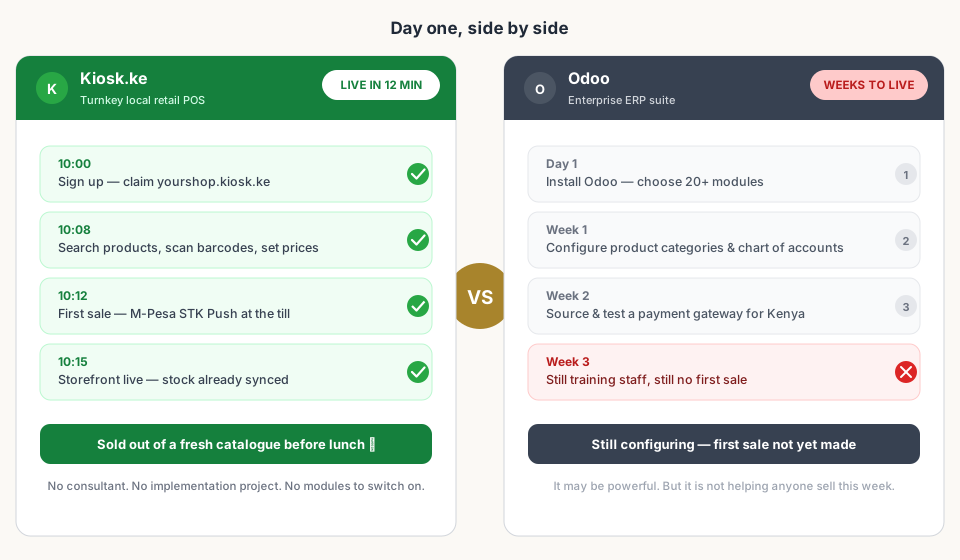
The gap isn't a small inconvenience. It's the difference between a tool that pays for itself by Friday and a project that's still on your to-do list next month — while competitors take your WhatsApp orders in the meantime.
2. M-Pesa Is Not a Feature — It's the Till
In Kenya, mobile money isn't an add-on your business might adopt someday. It's how customers pay. Roughly nine out of ten till transactions at a Kenyan counter involve mobile money, and every extra step between 'the customer wants to pay' and 'the money is in your account' costs you sales.
Odoo — a Belgian ERP — does not ship with M-Pesa. To accept payments you install a community module, register for gateway credentials, configure sandbox keys, and pray the plugin keeps working after the next Odoo update. That's not a checkout flow; that's a second job.
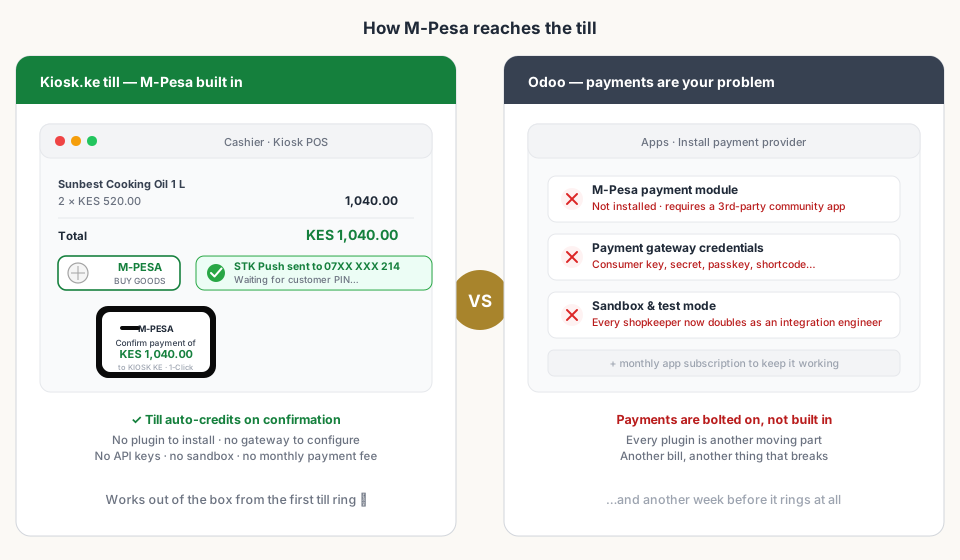
- Kiosk.ke: ring the sale, hit M-Pesa, STK Push is sent, the till auto-credits on confirmation. No plugin, no keys, no sandbox, no monthly payment-module fee.
- Odoo: install a module, configure credentials, test in sandbox, go live — and still pay for the module's subscription to keep it running.
3. One Inventory Beats Four Numbers
The moment you sell in two places — at the counter and on your storefront — you have a reconciliation problem. The classic ERP answer is 'modules': a warehouse module, an eCommerce module, a POS module, a purchasing module. Each tracks its own number, and someone has to make sure they agree.
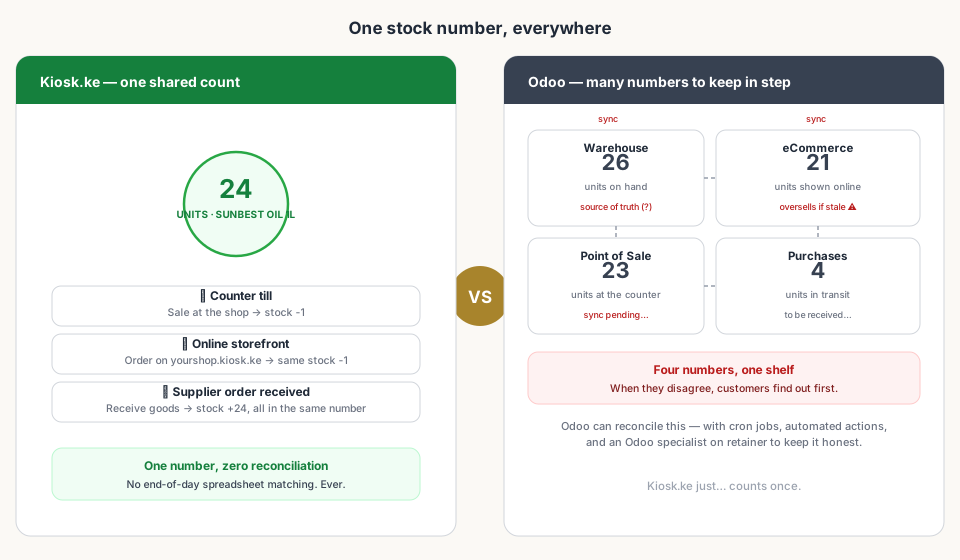
Kiosk.ke treats inventory as a single number. A sale at the till decrements it. An order on your storefront decrements the same number. Receiving a supplier delivery increments it. What the shelf says is what the website says — because there is only one number to be right about.
4. Your Storefront Should Exist by Dinner, Not Next Quarter
A website only earns money once it's live. Every day your shop is invisible online is a day a customer who searched for 'cooking oil near me' bought from someone else. Odoo's eCommerce module is genuinely capable — after you pick a theme, build pages, configure taxes and currencies, wire up payments and delivery, and upload photography.
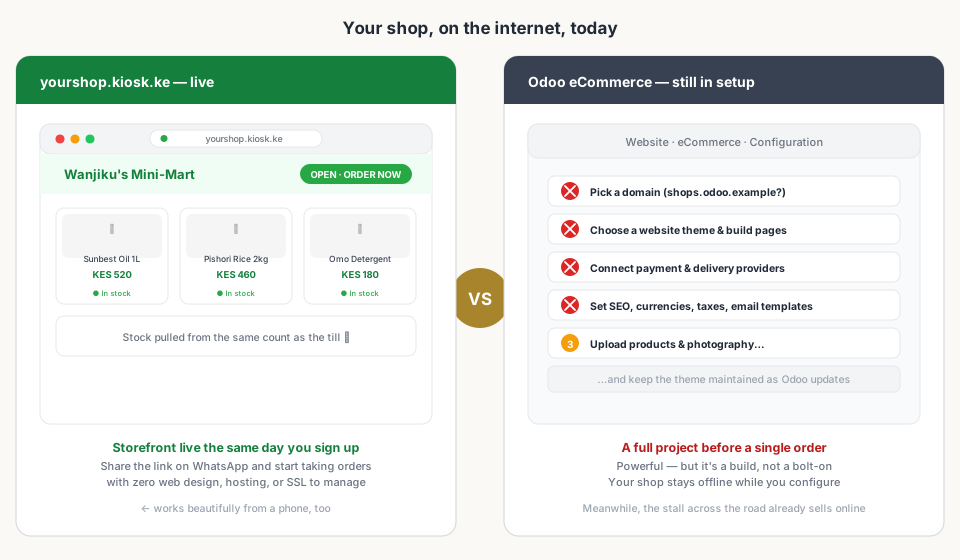
With Kiosk.ke, claiming your storefront is part of signing up. The same product catalogue that runs your till runs your web shop — which is why the stock matches, why the prices match, and why you can send a customer a link before dinner.
5. The Cost of 'Free' Is Real
| Cost | Kiosk.ke | Odoo |
|---|---|---|
| Setup time | Minutes — self-serve, from your phone | Weeks to months — an implementation project |
| M-Pesa payments | Built in, works on day one | Third-party module + credentials + sandbox testing |
| Licensing | Priced for a shop counter | Per-app, per-user fees that scale as you add apps |
| Storefront | yourshop.kiosk.ke, live the same day | eCommerce module: theme, pages, hosting, config |
| Maintenance | Handled for you | Updates, broken plugins, and a specialist on call |
None of this is to say Odoo is overpriced — for what it does, it's remarkably good value. But 'good value for an ERP' and 'good value for a shop' are different sentences. If you are paying for HR modules and multi-warehouse logic, you are paying for machinery you don't have yet.
6. What Odoo Genuinely Does Better (Be Honest)
Credibility demands we say this plainly. Odoo is excellent at things Kiosk.ke will never pretend to do:
- Manufacturing — bills of materials, routing, and production planning that are genuinely world-class.
- Multi-warehouse logistics — inventory across locations, transfers, and complex supply chains.
- People operations — payroll, HR, and expense workflows for teams of dozens or hundreds.
- Full financial depth — a double-entry chart of accounts feeding auditors and lenders.
If you run a factory, a chain with a central depot, or a company with an HR department, you should absolutely be evaluating Odoo. This post isn't arguing with that. It's arguing that a shopkeeper with a counter, a storefront, and a phone is closer to Odoo's ceiling than to where Odoo starts to pay.
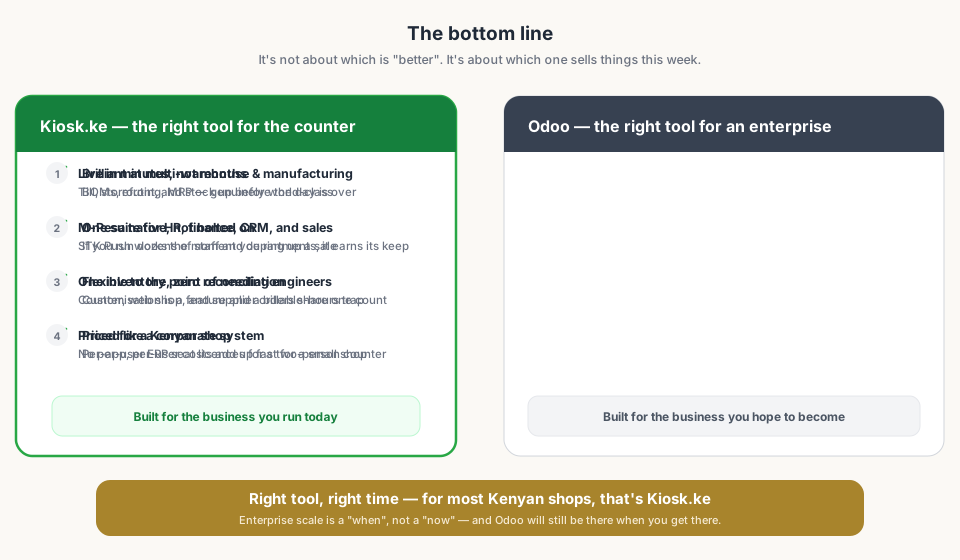
Bottom Line
Read next:
- Choosing the Right POS: Kiosk.ke vs. OdooThe balanced, decision-first guide this post argues from.
- ERP vs. POS: Do You Need the Full Suite?When a lean POS is enough and an ERP is overkill.
- Why M-Pesa Integration MattersWhy native mobile money beats bolted-on payment plugins.
- Set Up a POS in 30 MinutesGet your till and storefront live the same afternoon.
- The Real Cost of 'Free' SoftwareHidden fees, add-on modules, and implementation hours.
Frequently asked questions
Is Odoo free?
Odoo Community is open-source, but hosting, modules, customisation, and support add up quickly. For a small shop the real cost is the weeks it takes to get live — weeks you could have been selling.
Can Odoo accept M-Pesa?
Yes, but not out of the box. You need a third-party payment module, gateway credentials, and configuration work. Kiosk.ke has native M-Pesa STK Push built into the till from day one.
Is Kiosk.ke better than Odoo?
For a Kenyan micro-merchant or single-shop retailer, usually yes: Kiosk.ke is live in minutes, with native mobile money and one shared inventory. Odoo genuinely wins for enterprises with manufacturing, HR, and multi-warehouse needs.
When should I switch from Kiosk.ke to Odoo?
When you outgrow the counter — multiple warehouses, manufacturing, or a whole finance team. The good news: the stock and sales discipline you build with Kiosk.ke travels well into any bigger system.
Related articles
- ComparisonChoosing the Right POS for Your Business: Kiosk.ke vs. OdooA clear guide to deciding between Kiosk.ke — a turnkey local retail POS — and Odoo, a full enterprise ERP suite. Compare setup time, payments, and who each platform fits.
- ComparisonERP vs. POS: Do You Need the Full Suite?An ERP can run your whole company. A POS needs to run your counter. Knowing which problem you have today saves months of implementation.
- PaymentsWhy M-Pesa Integration Matters (and What 'Native' Really Means)In Kenya, mobile money is how customers pay. What native M-Pesa at the till means — STK Push in one tap, auto-credited sales, and a shift that balances itself.
- Getting startedSet Up a POS in Kenya in 30 MinutesHow to set up a POS in Kenya in 30 minutes — create your account, add products, take M-Pesa payments, and stay eTIMS-ready with KRA. No IT project required.
- GuidesThe Real Cost of 'Free' SoftwareHidden fees, add-on modules, and implementation hours — what 'free' POS and ERP tools often cost in practice.
- HardwareWhat Hardware Do You Actually Need for a POS in Kenya?Phone, scanner, printer — a no-nonsense hardware checklist for a Kenyan retail counter. Start with the phone you own, upgrade when the queue demands it.
- InventoryOnline + Physical: One Inventory (Stop Selling What You Don't Have)How a single stock count across your web shop and counter stops overselling, ghost stock, and late-night spreadsheet reconciliations.
- Guides5 Signs You've Outgrown Your POSStock mismatches, slow checkouts, and spreadsheet workarounds — the clear signals it's time to upgrade your point of sale.
Ready for a POS built for Kenya?
Start free on Kiosk.ke — barcode POS, native M-Pesa STK, offline sales, and an online storefront from one stock count.