
Series 03
Kiosk vs Odoo
Series 03
Kiosk vs Odoo
Guides
5 Signs You've Outgrown Your POS
Stock mismatches, slow checkouts, and spreadsheet workarounds — the clear signals it's time to upgrade your point of sale.
Updated 24 August 2026 · Kiosk
No one wakes up and decides their till is too small. It happens gradually — a stock count that never quite matches, a checkout that slows at the worst moment, a spreadsheet that quietly became the real system. These aren't signs your shop is failing. They're signs your shop has outgrown its tool. And that's a much easier problem to fix.
The Five Signs
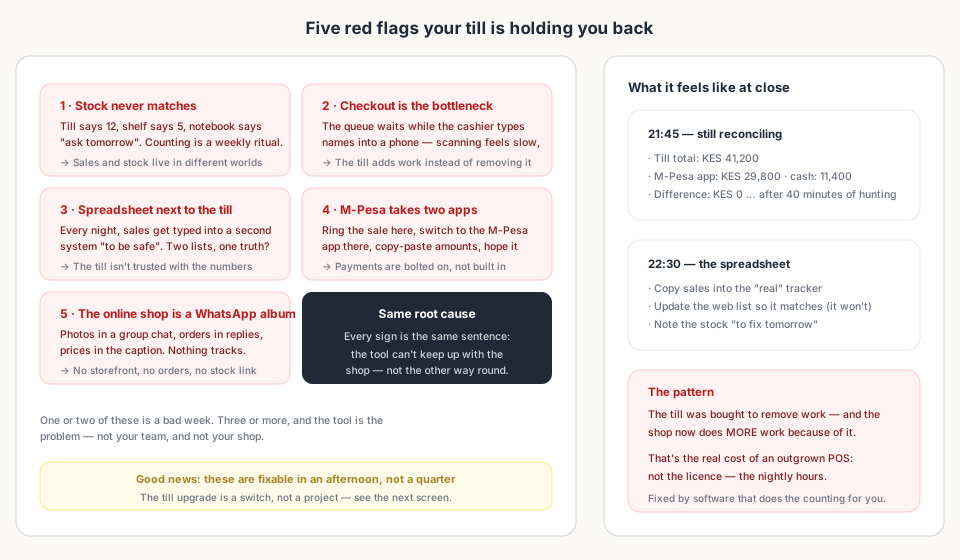
1. Stock Counts Never Match
The till says twelve, the shelf says five, and the notebook says 'ask tomorrow'. When counting becomes a weekly ritual and every sale leaves a question mark, sales and stock have drifted into different worlds. The till should make stock self-evident — when it doesn't, it's not tracking anything you can trust.
2. Checkout Is the Slowest Part of the Day
The queue waits while the cashier types product names into a phone, one letter at a time. Scanning feels slower than it should, payments take a detour, and the till — which should be the fastest thing at the counter — is the bottleneck. A POS that adds work to every sale has lost its reason to exist.
3. You Keep a Spreadsheet Next to the Till
Every night, sales get copied into a second system 'to be safe'. Two lists, one truth — and the truth lives in whichever one was updated last. The spreadsheet isn't a backup; it's the shop telling you it doesn't trust the till with the numbers.
4. M-Pesa Takes Two Apps and a Prayer
Ring the sale here, switch to the M-Pesa app there, copy the amount, paste it somewhere, hope the records line up at close. In Kenya, mobile money is how customers pay — if the till doesn't send the STK push itself and auto-credit the sale, payments are bolted on instead of built in, and every sale carries extra steps.
5. Your 'Online Shop' Is a WhatsApp Album
Photos in a group chat, orders in replies, prices in the caption. It works — until it doesn't. There's no stock to check, no order to track, and no number that tells you what actually sold online. That's not a storefront; it's a thread with ambitions.
The Upgrade: Same Shop, Different Evening
Here's what fixing all five looks like in practice — the same shop, the same stock, a different way of closing the day:
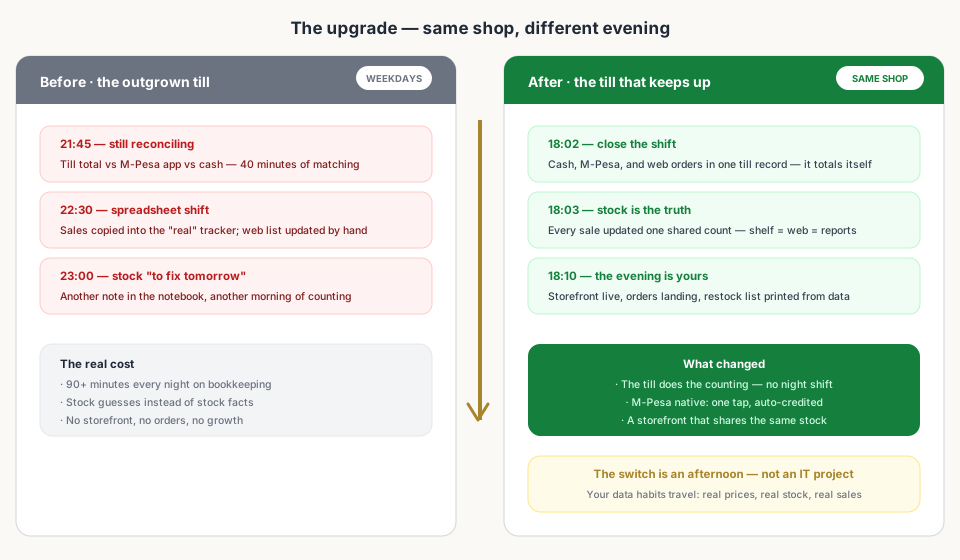
- Native M-Pesa — one tap sends the push; the sale auto-credits on the customer's PIN.
- One shared inventory — counter, web, and supplies write to the same number.
- A real storefront — orders land in the till record, not in a WhatsApp reply.
- A close that balances itself — cash, M-Pesa, and web orders in one report.
Bottom Line
Read next:
- ERP vs. POS: Do You Need the Full Suite?When the fix is a better till — and when it's genuinely an ERP.
- Set Up a POS in Kenya in 30 MinutesThe upgrade is an afternoon — here's the walkthrough.
- Online + Physical: One InventoryOne stock count kills the spreadsheet and the ghost stock.
- Why Kiosk.ke Beats Odoo for Kenyan ShopsNative M-Pesa and one inventory versus bolted-on everything.
- Top 10 POS Systems in Kenya (2026)The ranking that compares your upgrade options.
Frequently asked questions
How do I know I've outgrown my POS?
The clearest signal is work the till was supposed to remove: nightly reconciliation, a spreadsheet next to the counter, stock that never matches, or a checkout that's slower than the customers it serves. When the tool adds work instead of removing it, you've outgrown it.
Is it the POS or just a busy period?
One or two rough days is a busy week. Three or more of the signs persisting for weeks — wrong stock counts, payment workarounds, spreadsheet fixes — means the pattern is the tool, not the traffic.
Do I need an ERP when my POS feels small?
Not usually. The step from an outgrown till is a better POS, not a company-wide ERP. The ERP conversation starts when you add warehouses, manufacturing, or an HR and finance team — see the ERP vs POS guide for the full test.
Will upgrading lose my data?
It shouldn't. A POS worth switching to imports your real products, prices, and stock — and the habits you already have (ringing every sale, honest prices) are exactly the data a new system wants. The switch is an afternoon, not an IT project.
What's the fastest win after upgrading?
Native M-Pesa and one shared inventory. Payments that auto-credit kill the nightly reconciliation, and one stock count across till and storefront kills the spreadsheet — the two biggest time sinks disappear in the first week.
Related articles
- ComparisonChoosing the Right POS for Your Business: Kiosk.ke vs. OdooA clear guide to deciding between Kiosk.ke — a turnkey local retail POS — and Odoo, a full enterprise ERP suite. Compare setup time, payments, and who each platform fits.
- ComparisonERP vs. POS: Do You Need the Full Suite?An ERP can run your whole company. A POS needs to run your counter. Knowing which problem you have today saves months of implementation.
- ComparisonWhy Kiosk.ke Beats Odoo for Kenyan ShopsOdoo is a powerful ERP, but for a Kenyan shop, Kiosk.ke wins. Native M-Pesa, a live storefront, and one inventory — live in minutes, not months.
- Getting startedSet Up a POS in Kenya in 30 MinutesHow to set up a POS in Kenya in 30 minutes — create your account, add products, take M-Pesa payments, and stay eTIMS-ready with KRA. No IT project required.
- InventoryOnline + Physical: One Inventory (Stop Selling What You Don't Have)How a single stock count across your web shop and counter stops overselling, ghost stock, and late-night spreadsheet reconciliations.
- RankingsTop 10 POS Systems in Kenya (2026) — Ranked & ComparedBest POS systems in Kenya for 2026, ranked on setup speed, native M-Pesa, eTIMS readiness, and shop-floor fit. Compare Kiosk.ke, Odoo, SimbaPOS, Tiwi, and more.
Ready for a POS built for Kenya?
Start free on Kiosk.ke — barcode POS, native M-Pesa STK, offline sales, and an online storefront from one stock count.