
Series 05
Kopo Kopo
Series 05
Kopo Kopo
Payments
Why Your M-Pesa Payments Aren't Syncing with Your Sales Records
M-Pesa payments that never appear in your sales reports are usually one of five fixable problems — and the fix is almost always a real integration, not more manual checking.
25 August 2026 · Kiosk
The money arrived — customers paid, the account grew — but your sales records don't show it. At close, you're scrolling messages to find what the till missed. Before you blame the staff or the books, know this: when M-Pesa doesn't sync, it's almost never a people problem. It's one of five structural causes, and each one has a fix that takes minutes.
1. Before Anything Else: Did the Payment Actually Happen?
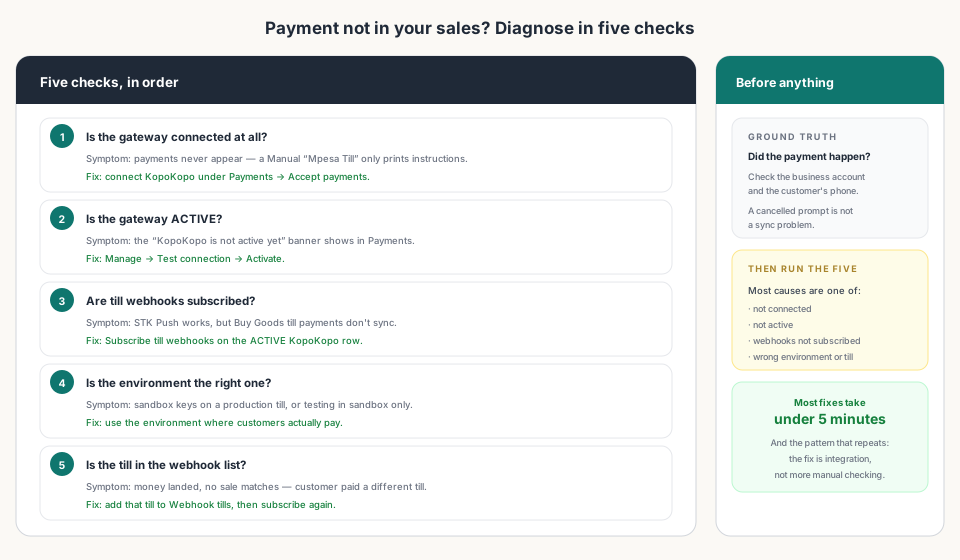
Ground truth first. STK prompts get declined and cancelled; a prompt that never completed is not a sync problem, it's a non-payment. Check the business account and, if needed, the customer's phone. If the money truly arrived, run the five checks below.
2. The Five Causes
In order, from most common to least:
- The gateway was never connected. A Manual 'Mpesa Till' row only prints your till and paybill numbers on receipts — it does not receive payment data. Symptom: payments never appear, and someone is doing all the matching by hand. Fix: connect KopoKopo under Payments → Accept payments.
- The gateway isn't ACTIVE. Symptom: the 'KopoKopo is not active yet' banner in Payments. Fix: Manage → Test connection → Activate.
- Till webhooks aren't subscribed. Symptom: STK Push works, but customers who pay the Buy Goods till directly never sync. Fix: Subscribe till webhooks on the ACTIVE KopoKopo row — that's what registers your tills and the callback.
- The environment is wrong. Symptom: sandbox keys on a production till, or everything tested in sandbox while customers pay the live till. Fix: use the environment where the money actually lands.
- The customer paid a different till. Symptom: money landed, no sale matches. Fix: add that till number to Webhook tills and subscribe again.
3. What 'Fixed' Looks Like
A connected till doesn't sync better — it syncs itself. Ring a KES 10 test sale, pay it two ways (STK Push to your own phone, then paying the Buy Goods till directly), and both should close a sale on their own. From then on, the shift report's M-Pesa column comes from confirmed payments and agrees with your business account.
4. When It's Still Not Sync
Once the five checks pass and a test payment closes a sale by itself, a 'missing' payment is almost always one of two things: the payment matched a different sale (a refund, or a customer paying twice), or the money never actually arrived. Both resolve faster now, because the till has a record either way.
Read next:
- Kopo Kopo Integration for POS Systems: The Complete GuideThe pillar guide — how integration prevents these five causes.
- How to Connect Kopo Kopo to Your POS SystemThe step-by-step setup — the fix for most of the five causes.
- Kopo Kopo API Webhooks Explained for Non-DevelopersWhat the signed confirmation is, and why subscribing matters.
- End-of-Day Reconciliation: Manual vs. AutomatedWhat the close looks like when payments match themselves.
- How to Reduce Payment Disputes at the TillWhen a 'missing' payment turns into a disagreement.
Frequently asked questions
Why don't my M-Pesa payments show in my sales records?
Almost always one of five structural causes: no real gateway (a manual till only prints instructions), the gateway not ACTIVE, till webhooks not subscribed, the wrong environment, or the customer paying a different till. The fix in every case is a few minutes in Payments settings.
What's the most common cause?
Either there was never a real integration — the 'Mpesa Till' row only prints instructions and doesn't receive payments — or the gateway is active but the till webhooks were never subscribed, so customer-initiated till payments arrive in silence.
Do I need to match every payment by hand?
No — that's the symptom, not the solution. A connected till matches each payment as it happens: Kopo Kopo sends a signed confirmation, and the sale closes itself. Hand-matching is what you do when the integration is missing.
How do I know which cause it is?
Run the five checks in order — gateway connected, gateway ACTIVE, webhooks subscribed, environment correct, right till. The first check that fails is your cause, and its fix is one step.
What does a fixed till look like?
A test payment closes a sale by itself — receipt, stock, shift record — and the shift's M-Pesa total agrees with your business account, with zero manual entries.
Will STK Push still work if webhooks aren't subscribed?
Possibly. STK Push (the till sends the prompt) can work without webhooks, but customer-initiated Buy Goods till payments won't sync until the till webhooks are subscribed. That's the exact split you'll notice first.
Related articles
- PaymentsKopo Kopo Integration for POS Systems: The Complete GuideHow Kopo Kopo connects to a POS — Buy Goods tills, STK Push, and signed webhooks that match every M-Pesa payment to a sale automatically. The complete guide for Kenyan retailers.
- OperationsEnd-of-Day Reconciliation: Manual M-Pesa Checking vs. Automated POS MatchingThe nightly ritual of matching M-Pesa messages to sales — and what your close looks like when the till does the matching instead.
- PaymentsKopo Kopo API Webhooks Explained for Non-DevelopersWebhooks are how your till finds out a payment happened — in plain English. What a signed payment notification is, why it beats checking messages, and what it means for your shop.
- Getting startedHow to Connect Kopo Kopo to Your POS System (Step-by-Step)Step by step: connect your Kopo Kopo account to your POS — API credentials, environment, till numbers, webhook subscription, and a test payment before you go live.
- PaymentsHow to Reduce Payment Disputes at the Till with Integrated ConfirmationsA customer insists they paid, your cashier says no — that's a dispute with no evidence. Integrated confirmations give both sides a record that settles it in seconds.
Ready for a POS built for Kenya?
Start free on Kiosk.ke — barcode POS, native M-Pesa STK, offline sales, and an online storefront from one stock count.