
Series 05
Kopo Kopo
Series 05
Kopo Kopo
Payments
Kiosk.ke's Kopo Kopo Integration: Why It's the Best for Kenyan Shops
How Kiosk.ke connects Kopo Kopo to your till — native STK Push, Buy Goods till matching, signed webhooks, and supplier Send Money — and why that makes it the best Kopo Kopo integration in Kenya.
25 August 2026 · Kiosk
Walk into a shop running Kiosk.ke and watch M-Pesa happen. The cashier rings the sale, taps M-Pesa, and the customer's phone lights up with a prompt. Seconds later the receipt prints, the stock drops, and the money is already reconciled. That's Kopo Kopo doing the heavy lifting — and it's the deepest Kopo Kopo integration you'll find on a Kenyan POS.
This guide is the Kiosk deep-dive in the Kopo Kopo series: how Kiosk.ke connects to Kopo Kopo, what the till actually does with a payment, how supplier payouts run on the same rails, and why the whole thing is built the way it is.
1. The Setup: Ten Minutes, Three Steps
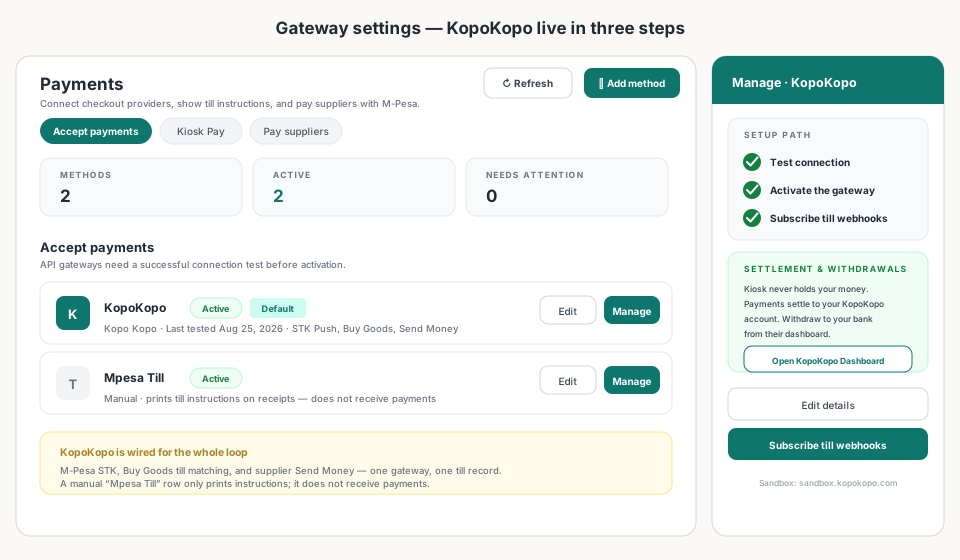
On Kiosk, Kopo Kopo is a payment method, not a project. From Payments → Accept payments → Add method, choose KopoKopo and paste the credentials from your Kopo Kopo account — Client ID, Secret, and API Key — then pick sandbox or production.
Three steps stand between you and live payments:
- Test connection — Kiosk calls Kopo Kopo with your credentials and confirms they work.
- Activate — the gateway goes live for STK Push and till matching.
- Subscribe till webhooks — Kiosk registers your till numbers with Kopo Kopo so till payments land in the POS automatically.
2. Two Ways to Take M-Pesa, One Till Record
At the counter, Kiosk gives cashiers two ways to take M-Pesa — and both finish the same way: the sale closes itself.
STK Push: the cashier taps M-Pesa, enters the customer's number, and the till sends the prompt. The customer confirms the amount and enters their PIN, and the sale completes — receipt printed, stock dropped, payment in the shift record. Amounts are kept in whole shillings so the sale matches Kopo Kopo's charge exactly.
Buy Goods till: customers who'd rather pay the till number directly keep doing exactly that. The till listens — the cashier can keep adding items — and when Kopo Kopo's webhook confirms a payment for this total, the sale completes automatically. The till shows 'Listening for till payment…' while it waits.
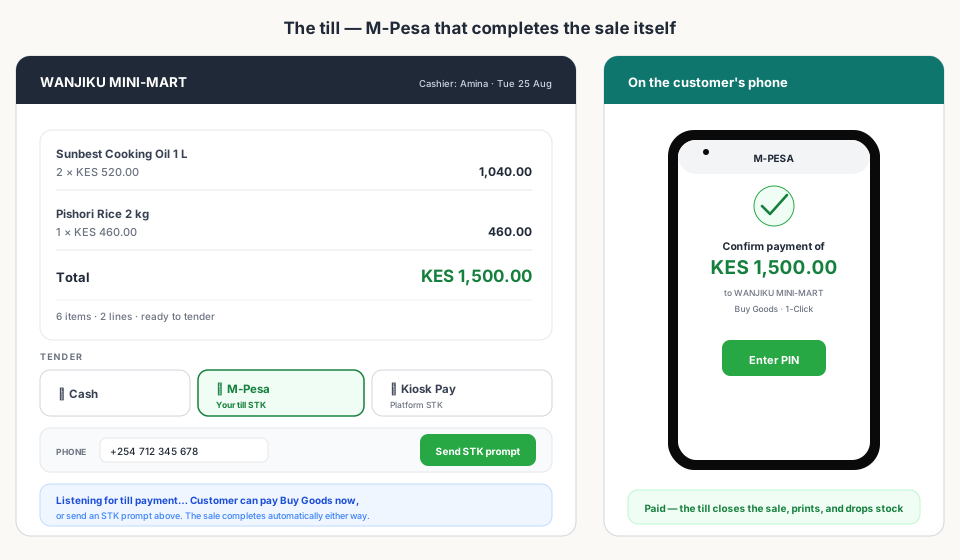
Either way, the payment lands in the same sale record as cash. No separate payment log, no 'which message was that?' at close.
3. Webhooks That Close the Sale Themselves
The reason this works without a single manual entry is the webhook. When a customer pays, Kopo Kopo sends a payment notification to Kiosk — signed, so it can't be faked by a customer or a staff member — and the till verifies it before acting.
Then it matches: the confirmation is tied to an open sale by amount, and by the paying number where Kopo Kopo provides it. Match found — the sale closes. No match — the payment waits in a visible state until a cashier resolves it. Nothing silently disappears.
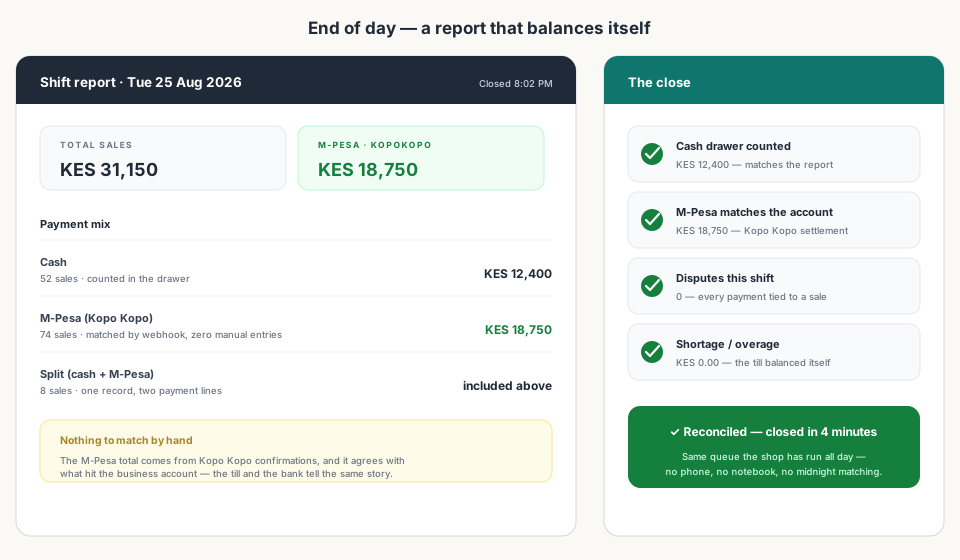
At close, the payoff is visible — the shift report totals itself from confirmed payments, and the M-Pesa column agrees with your business account.
Kopo Kopo also tells Kiosk who paid — first name, last name, and a masked number — so the till can recognise repeat customers without a manual lookup, including customers buying on credit.
4. Supplier Payouts on the Same Rails
The integration isn't one-way. Paying suppliers runs through Kopo Kopo Send Money from the same gateway: mark a supplier's payout method as 'M-Pesa via KopoKopo Send Money' on their profile, and Kiosk sends the payout when you settle an invoice.
The ledger updates when Kopo Kopo confirms — not when you type it in — so money out is as trustworthy as money in. You can even set auto-pay times so standing supplier payments run on schedule without anyone at the till.
5. Your Money Stays Yours
Kiosk never holds your money. Payments settle to your Kopo Kopo account, and you withdraw to your bank from Kopo Kopo's dashboard — the same account you already use. Kiosk's job is the matching, not the holding.
Sandbox and production are both supported, so you can test the whole loop before a single real shilling moves.
6. Why This Is the Best Kopo Kopo Integration
Plenty of POS systems will tell you they 'support Kopo Kopo.' Most mean they let you display a till number on a receipt. Here's what integrated actually looks like:
| What the till does | Kiosk.ke + Kopo Kopo | A bolt-on 'support' |
|---|---|---|
| STK Push from the till | ✓ Built in — one tap | Usually redirects to a separate app |
| Buy Goods till matching | ✓ Auto-matches by amount + number | ✗ Manual matching at close |
| Signed webhook verification | ✓ Verified before the sale closes | ✗ Often no webhooks at all |
| Cash + M-Pesa in one sale record | ✓ One record, split payments included | ✗ Two ledgers to reconcile |
| Supplier Send Money payouts | ✓ Same gateway, auto-confirmed | ✗ Not available |
| Per-payment module fees | None — included in the plan | Often a paid add-on |
That last row is the tell. When payments are the product, the POS charges you a module fee and calls it integration. Kiosk built Kopo Kopo in because M-Pesa is how Kenyan customers pay — the counter should be faster, not sold an add-on.
Read next:
- Kopo Kopo Integration for POS Systems: The Complete GuideThe pillar guide — what Kopo Kopo is and how any POS connects to it.
- How to Connect Kopo Kopo to Your POS SystemThe step-by-step setup — credentials, webhook, and a test payment.
- Kopo Kopo API Webhooks Explained for Non-DevelopersHow signed payment confirmations reach the till — in plain English.
- End-of-Day Reconciliation: Manual vs. AutomatedWhat your close looks like when the till does the matching.
- Best POS Systems in Kenya with Kopo Kopo IntegrationHow other systems compare to the deep integration above.
- Is Kopo Kopo Safe? Security and Settlement ExplainedWhere your money sits and why confirmations can't be faked.
Frequently asked questions
Does Kiosk.ke support Kopo Kopo?
Yes — natively. Kiosk.ke connects to Kopo Kopo for M-Pesa STK Push at the till, Buy Goods till matching, and supplier Send Money payouts, all from one gateway under Payments → Accept payments. It's included from the free plan.
How do I connect Kopo Kopo to Kiosk.ke?
Payments → Accept payments → Add method → KopoKopo. Paste your Client ID, Secret, and API Key, choose sandbox or production, then: Test connection → Activate → Subscribe till webhooks. Most shops are live in about ten minutes.
Will Kopo Kopo payments match my sales automatically?
Yes. Every payment arrives as a signed webhook and is matched to the open sale by amount and paying number. The sale closes itself — receipt, stock, and shift record — with no manual entries.
Can my customers keep paying my Buy Goods till number?
Absolutely. The till listens for Buy Goods payments while the cashier keeps working, and the sale completes automatically when Kopo Kopo confirms a payment for the total. STK Push stays available for customers who prefer the prompt.
Does Kiosk.ke hold my Kopo Kopo money?
No. Payments settle to your own Kopo Kopo account, and you withdraw to your bank from Kopo Kopo's dashboard. Kiosk matches payments to sales; it never holds your takings.
Can I pay suppliers with Kopo Kopo inside Kiosk.ke?
Yes — Kopo Kopo Send Money is built into supplier payouts. Mark the supplier's payout method, settle the invoice, and the ledger updates when Kopo Kopo confirms. Auto-pay schedules are available too.
Related articles
- PaymentsKopo Kopo Integration for POS Systems: The Complete GuideHow Kopo Kopo connects to a POS — Buy Goods tills, STK Push, and signed webhooks that match every M-Pesa payment to a sale automatically. The complete guide for Kenyan retailers.
- Getting startedHow to Connect Kopo Kopo to Your POS System (Step-by-Step)Step by step: connect your Kopo Kopo account to your POS — API credentials, environment, till numbers, webhook subscription, and a test payment before you go live.
- PaymentsKopo Kopo API Webhooks Explained for Non-DevelopersWebhooks are how your till finds out a payment happened — in plain English. What a signed payment notification is, why it beats checking messages, and what it means for your shop.
- RankingsBest POS Systems in Kenya with Kopo Kopo IntegrationPOS systems in Kenya that work with Kopo Kopo — ranked on how deep the integration goes: native STK, till matching, webhooks, and settlement reports.
- PaymentsWhy Your M-Pesa Payments Aren't Syncing with Your Sales RecordsM-Pesa payments that never appear in your sales reports are usually one of five fixable problems — and the fix is almost always a real integration, not more manual checking.
- OperationsEnd-of-Day Reconciliation: Manual M-Pesa Checking vs. Automated POS MatchingThe nightly ritual of matching M-Pesa messages to sales — and what your close looks like when the till does the matching instead.
- GuidesIs Kopo Kopo Safe? Security and Settlement ExplainedWhere your money sits, who sees your credentials, and how signed webhooks keep payment confirmations from being faked. Kopo Kopo security for retailers.
- ComparisonKopo Kopo vs. the Direct Safaricom Daraja API: Which Should Your POS Use?Daraja gives you the raw Safaricom API. Kopo Kopo wraps it with support, webhooks, and multiple payment channels. What each means for your shop's till.
- PaymentsPOS with M-Pesa in Kenya: Native STK vs Bolt-OnsWhy a POS with native M-Pesa STK matters for Kenyan shops — and how to spot bolt-on payment plugins that slow the till.
- RankingsTop 10 POS Systems in Kenya (2026) — Ranked & ComparedBest POS systems in Kenya for 2026, ranked on setup speed, native M-Pesa, eTIMS readiness, and shop-floor fit. Compare Kiosk.ke, Odoo, SimbaPOS, Tiwi, and more.
Ready for a POS built for Kenya?
Start free on Kiosk.ke — barcode POS, native M-Pesa STK, offline sales, and an online storefront from one stock count.