
Series 05
Kopo Kopo
Series 05
Kopo Kopo
Payments
Kopo Kopo API Webhooks Explained for Non-Developers
Webhooks are how your till finds out a payment happened — in plain English. What a signed payment notification is, why it beats checking messages, and what it means for your shop.
25 August 2026 · Kiosk
A webhook is a phone call between systems. When a customer pays your till, Kopo Kopo doesn't wait for anyone to check anything — it calls your POS and says, 'KES 1,500 just landed on till 3502582, from a number ending in 123.' No developer required to understand that. This guide explains the whole idea over the counter.
You'll come away knowing the two halves of any webhook — the event and the delivery — why the call carries a signature, what your till does with it, and what breaks when webhooks aren't set up.
1. A Webhook Is Just a Phone Call
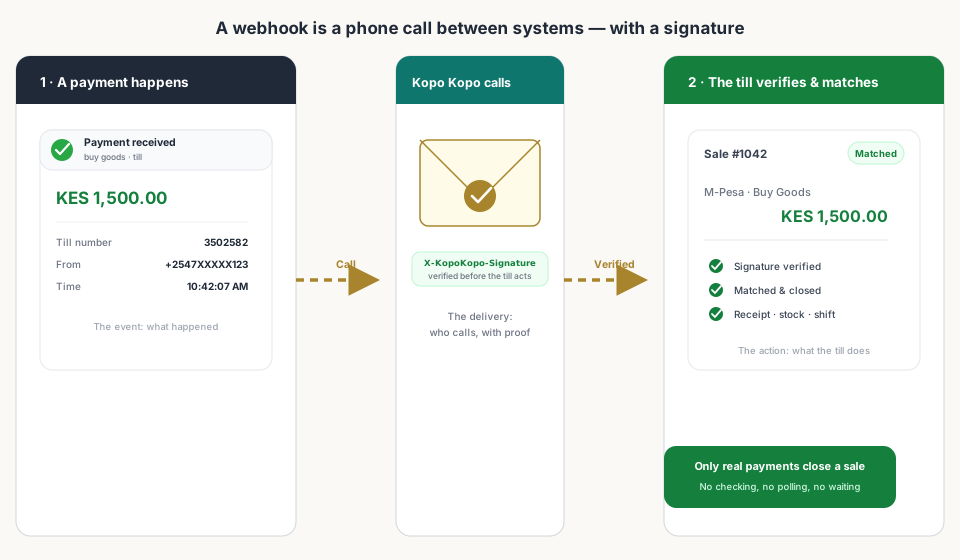
Every webhook has two halves. The event: what happened — a payment arrived, with its amount and its details. The delivery: how your till finds out — Kopo Kopo dials a callback URL your POS registered when you subscribed till webhooks.
- Who calls — Kopo Kopo, the moment the money moves.
- Who picks up — your POS, at the callback URL wired up during setup.
- What's said — a payment event: amount, till number, paying number, time.
- How you know it's genuine — a signature on the call.
2. The Signature Is What Makes It Trustworthy
The key word is signed. Kopo Kopo signs every payment notification with a secret only it and your POS share — carried in the X-KopoKopo-Signature header. Before the till closes a sale on the strength of a call, it checks the signature. Wrong signature, ignored.
Why that matters at the counter: the 'I paid' claim. A customer or a staff member cannot forge a confirmation. The only way a sale closes as paid is if Kopo Kopo itself confirmed the payment.
3. What the Till Does with the Call
- Matches it to an open sale — by amount, and by the paying number where available.
- Closes the sale — receipt, stock drop, and a payment line in the shift record.
- Or holds it — no match yet means the payment stays visible until a cashier resolves it. Nothing vanishes.
That's the whole magic: nobody checks anything, because the system that knows about the money is the system that tells the till.
4. Two Calls Your Till Cares About
In a shop, two Kopo Kopo webhooks matter, and both run through the same integration:
- Payment received — a customer paid a till (buy goods). Kiosk uses it to complete sales, including the 'listening for till payment' flow where the cashier keeps working while the customer pays.
- Send money — a payout was confirmed (Kopo Kopo Send Money). Kiosk uses it to update supplier ledgers the moment you pay an invoice.
One integration, two directions — money in and money out — and both update your records automatically.
5. Webhooks vs. Checking Messages
| Webhook (integrated) | Checking messages (manual) | |
|---|---|---|
| How the till learns | Instantly — Kopo Kopo calls | When someone scrolls to it |
| Accuracy | Exact amount, till, number, time | As good as the reading and typing |
| Signature check | Yes — can't be faked | None |
| Close time | Sale closes itself | Close waits on the match |
| What breaks | A misconfigured callback or till | Busy days, staff changes, deleted messages |
6. Why This Matters at Close
Because every payment arrived signed and matched at the moment it happened, the end-of-day report is a formality: the M-Pesa column comes from confirmed payments, and it agrees with your business account. Reconciliation doesn't disappear — it shrinks to the exceptions, and most days there are none.
Read next:
- Kopo Kopo Integration for POS Systems: The Complete GuideThe pillar guide — how the whole integration fits together.
- How to Connect Kopo Kopo to Your POS SystemThe step-by-step setup, including subscribing till webhooks.
- End-of-Day Reconciliation: Manual vs. AutomatedWhat the close looks like when every payment already matched itself.
- Why Your M-Pesa Payments Aren't Syncing with Your Sales RecordsThe common causes — unsubscribed tills among them.
- Kiosk.ke's Kopo Kopo IntegrationThe deep-dive on how Kiosk uses payment and Send Money webhooks.
Frequently asked questions
What is a webhook in plain English?
An automated call from Kopo Kopo to your POS the moment a payment happens — with the amount, the till number, the paying number, and the time. No one checks anything; the system that knows about the money is the system that tells the till.
Does a webhook close the right sale?
Yes. The till matches the notification to an open sale by amount, and by the paying number where Kopo Kopo provides it. If nothing matches, the payment stays visible until a cashier resolves it — it doesn't silently vanish.
Can a webhook be faked?
No. Kopo Kopo signs every notification with a secret only it and your POS share (the X-KopoKopo-Signature). The till checks the signature before acting, so a customer or staff member can't forge a confirmation.
Do I need a developer to set up webhooks?
On Kiosk, no. The 'Subscribe till webhooks' action registers your till numbers and the callback URL automatically. On a POS without this, you'd typically paste a callback URL into the Kopo Kopo dashboard — that's the manual version.
What's the difference between a webhook and polling?
A webhook is Kopo Kopo calling the till the instant a payment happens. Polling is the till asking Kopo Kopo 'any payments yet?' over and over. Webhooks are instant and free to check; polling is slower and wastes effort on empty answers.
Which Kopo Kopo webhooks matter for a shop?
Two: payment received (a customer paid a till — Kiosk uses it to complete sales, including the 'listening for till payment' flow) and send money (a payout was confirmed — Kiosk uses it to update supplier ledgers). One integration, money in and money out.
Related articles
- PaymentsKopo Kopo Integration for POS Systems: The Complete GuideHow Kopo Kopo connects to a POS — Buy Goods tills, STK Push, and signed webhooks that match every M-Pesa payment to a sale automatically. The complete guide for Kenyan retailers.
- Getting startedHow to Connect Kopo Kopo to Your POS System (Step-by-Step)Step by step: connect your Kopo Kopo account to your POS — API credentials, environment, till numbers, webhook subscription, and a test payment before you go live.
- PaymentsWhy Your M-Pesa Payments Aren't Syncing with Your Sales RecordsM-Pesa payments that never appear in your sales reports are usually one of five fixable problems — and the fix is almost always a real integration, not more manual checking.
- PaymentsKiosk.ke's Kopo Kopo Integration: Why It's the Best for Kenyan ShopsHow Kiosk.ke connects Kopo Kopo to your till — native STK Push, Buy Goods till matching, signed webhooks, and supplier Send Money — and why that makes it the best Kopo Kopo integration in Kenya.
- OperationsEnd-of-Day Reconciliation: Manual M-Pesa Checking vs. Automated POS MatchingThe nightly ritual of matching M-Pesa messages to sales — and what your close looks like when the till does the matching instead.
Ready for a POS built for Kenya?
Start free on Kiosk.ke — barcode POS, native M-Pesa STK, offline sales, and an online storefront from one stock count.