
Series 05
Kopo Kopo
Series 05
Kopo Kopo
Operations
End-of-Day Reconciliation: Manual M-Pesa Checking vs. Automated POS Matching
The nightly ritual of matching M-Pesa messages to sales — and what your close looks like when the till does the matching instead.
25 August 2026 · Kiosk
Every shop has a close. Cashiers leave, the till stops, and somebody sits down with the day's money on one side and the day's record on the other, and makes them agree. When the payments are cash, this is quick. When half of them came through M-Pesa, it becomes a second job.
Reconciliation is just making two records agree: what you sold versus what you received. This guide compares the two ways that happens at a Kenyan counter — the manual ritual and the automated close — and what each one actually costs you.
1. What Reconciliation Actually Is
Two ledgers, one story. The sales ledger: the till's record of what went out the door. The payment ledger: what actually arrived — cash in the drawer, M-Pesa in the messages. Reconciling means proving the two tell the same story.
Cash is self-balancing — it's in the drawer, and the drawer either counts up or it doesn't. M-Pesa is the problem child: the money is in your business account, but the evidence of which sale it paid for lives in a string of SMS messages on someone's phone.
2. The Manual Ritual, Step by Step
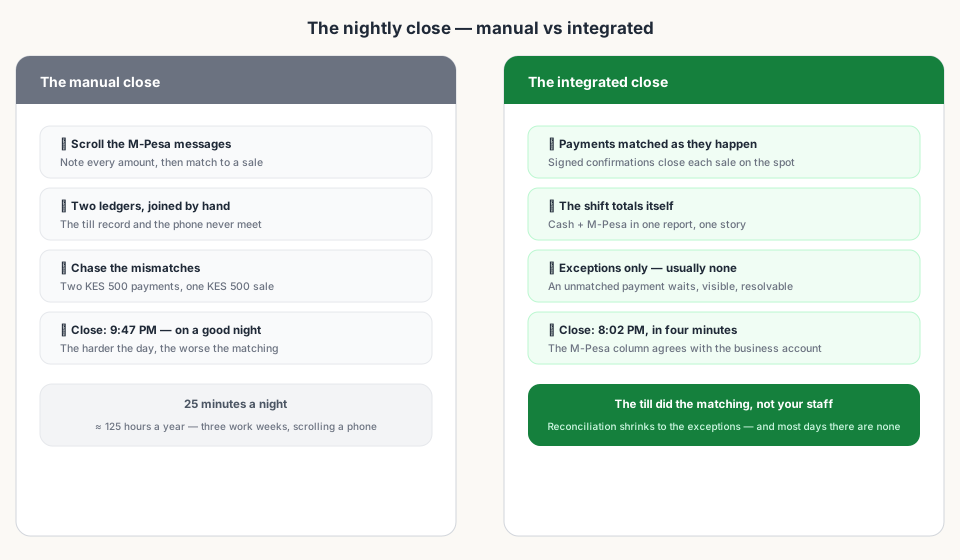
- Scroll the M-Pesa messages for the day and note every amount.
- Match each one to a sale on the till — same amount, and hope nothing is ambiguous.
- Chase the mismatches: a payment with no sale, a sale with no payment, two KES 500 payments and one sale for KES 500.
- Settle the ones you can; write off the ones you can't.
Put a number on it. Fifty M-Pesa sales a day — nothing for a busy mini-mart — at thirty seconds each is twenty-five minutes of your most senior person's time, every single night. Across a year, that's over 125 hours: more than three full working weeks, spent scrolling a phone.
3. Where Manual Reconciliation Breaks
- Busy days — the more payments, the slower and sloppier the match.
- Split payments — one sale, two payment lines; easy to count twice or not at all.
- Multiple tills — messages from three till numbers mixed into one phone.
- Staff changes — the person who knows the 'system' leaves, and the system was in their head.
- Silent failures — a payment that never confirms, or confirms to a till the records don't know.
4. The Automated Close
With an integrated till, matching happens at the moment of payment, not at midnight. Kopo Kopo's signed confirmation arrives, the till ties it to the open sale, and the close becomes a report:
- M-Pesa totals come from confirmed payments — matched, not remembered.
- Cash and M-Pesa live in the same shift record; split payments are one sale with two lines.
- Exceptions are visible: a payment that doesn't match waits in a state a cashier resolves — usually minutes, not hours.
- The close takes minutes: the drawer agrees with the cash total, and the M-Pesa column agrees with the business account.
5. What Good Reconciliation Buys You
- Fewer disputes — a confirmed payment is tied to a sale, with the amount and the time.
- Less shrinkage — staff can't pocket 'unmatched' payments when every payment is already matched.
- Accurate reports — your daily, weekly, and tax numbers start from facts, not recall.
- A calm close — the last cashier leaves on time, and so does the owner.
Read next:
- Kopo Kopo Integration for POS Systems: The Complete GuideThe pillar guide — integration from till setup to auto-matching.
- Why Your M-Pesa Payments Aren't Syncing with Your Sales RecordsWhen matching breaks — the causes and the fixes.
- How to Reduce Payment Disputes at the TillConfirmed payments settle the 'I paid / you didn't' argument.
- Kopo Kopo API Webhooks Explained for Non-DevelopersThe signed call that makes automated matching possible.
- Kiosk.ke's Kopo Kopo IntegrationThe deep-dive on how the close looks when payments are native.
Frequently asked questions
What is end-of-day reconciliation?
Making two records agree: what the till says you sold and what actually arrived — cash in the drawer, M-Pesa in the account. For mobile money, that means matching every payment to a sale.
How long does manual M-Pesa reconciliation take?
Roughly thirty seconds per payment. Fifty M-Pesa sales a day is twenty-five minutes of someone's time every night — about 125 hours a year, more than three full working weeks, spent scrolling a phone.
What happens when a payment doesn't match a sale?
With an integrated till, it waits in a visible state until a cashier resolves it — the exception, not the routine. Done by hand, it becomes a call to a customer, a dispute, or a quiet write-off.
Does an integrated POS do reconciliation for me?
It matches payments as they happen — a signed confirmation from Kopo Kopo closes the right sale — so the close becomes a report: cash, M-Pesa, and splits, already agreeing with your business account. Exceptions still need a human, but they're rare.
Can I reconcile M-Pesa payments without an integrated POS?
Yes — by hand, which is exactly the ritual this guide compares: scroll the messages, match each amount to a sale, chase the mismatches. It works; it just costs time every single night and accuracy on the nights it matters most.
What makes reconciliation go wrong?
Split payments counted twice, several tills mixed into one phone, deleted messages, staff changes that lose the unwritten 'system,' and payments that confirm to a till the records don't know. An integrated till removes every one of those failure modes.
Related articles
- PaymentsKopo Kopo Integration for POS Systems: The Complete GuideHow Kopo Kopo connects to a POS — Buy Goods tills, STK Push, and signed webhooks that match every M-Pesa payment to a sale automatically. The complete guide for Kenyan retailers.
- PaymentsWhy Your M-Pesa Payments Aren't Syncing with Your Sales RecordsM-Pesa payments that never appear in your sales reports are usually one of five fixable problems — and the fix is almost always a real integration, not more manual checking.
- PaymentsHow to Reduce Payment Disputes at the Till with Integrated ConfirmationsA customer insists they paid, your cashier says no — that's a dispute with no evidence. Integrated confirmations give both sides a record that settles it in seconds.
- PaymentsKiosk.ke's Kopo Kopo Integration: Why It's the Best for Kenyan ShopsHow Kiosk.ke connects Kopo Kopo to your till — native STK Push, Buy Goods till matching, signed webhooks, and supplier Send Money — and why that makes it the best Kopo Kopo integration in Kenya.
- PaymentsKopo Kopo API Webhooks Explained for Non-DevelopersWebhooks are how your till finds out a payment happened — in plain English. What a signed payment notification is, why it beats checking messages, and what it means for your shop.
Ready for a POS built for Kenya?
Start free on Kiosk.ke — barcode POS, native M-Pesa STK, offline sales, and an online storefront from one stock count.