
Series 05
Kopo Kopo
Series 05
Kopo Kopo
Guides
Is Kopo Kopo Safe? Security and Settlement Explained
Where your money sits, who sees your credentials, and how signed webhooks keep payment confirmations from being faked. Kopo Kopo security for retailers.
25 August 2026 · Kiosk
'Is Kopo Kopo safe?' deserves a straight answer, not a brochure. The honest way to answer it is to follow the money: where it sits between the customer's PIN and your bank, who can touch it, and how payment confirmations are kept unforgeable. That's what this guide does.
1. Where Your Money Sits
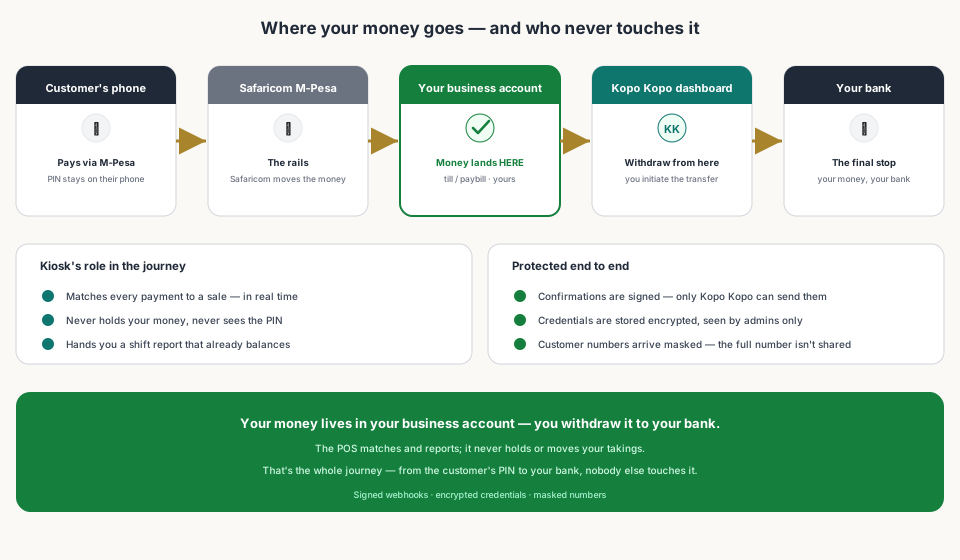
When a customer pays your till, the money moves through Safaricom's M-Pesa into your business account — the till or paybill registered to you. It does not sit in a Kopo Kopo wallet, and it does not sit with your POS. Kopo Kopo's role is the rails and the confirmations; settlement and withdrawal happen from your own Kopo Kopo dashboard, where you initiate the transfer to your bank.
That's the first and biggest answer: the money is yours, in your account, from the moment it moves. No intermediary holds it overnight.
2. Who Can Touch What
Your Kopo Kopo credentials — Client ID, Client Secret, and API Key — are the keys. They connect your POS to your account, and they should live with the owner and whoever you grant admin rights to. Kiosk stores them encrypted and uses them only to connect; it never shows them back to staff at the till.
Withdrawals are a separate layer: they happen from the Kopo Kopo dashboard, behind your login. So dashboard security — a strong password, and two-factor authentication if available — is the real lock on your money.
3. Confirmations Can't Be Faked
The security that matters at the counter is proof. Every payment confirmation Kopo Kopo sends is signed — the X-KopoKopo-Signature — and the till verifies the signature before it closes a sale. A customer cannot claim a payment that never happened, and a staff member cannot record one. The only way a sale closes as paid is if Kopo Kopo itself confirmed the money.
Customer data gets the same care: paying numbers arrive masked, like +2547XXXXX123, so the till can recognise a customer without handling their full number — and Kiosk uses that masked identity for repeat and credit customers.
4. The Rails Themselves
Kopo Kopo is one of Kenya's longest-standing payment technology companies, built on Safaricom's mobile money infrastructure. It doesn't run its own parallel payment network — it makes the network Kenyan shops already use work harder for you. That means the security of every transaction starts with M-Pesa's own protections, and Kopo Kopo adds the automation layer on top.
5. What You Should Still Do
- Keep the credentials with the owner — don't hand the Client Secret to every cashier.
- Use a strong password and two-factor authentication on the Kopo Kopo dashboard.
- Review the till list in your config — only the tills you actually use should be subscribed.
- Match the environment to where customers pay: production for live money, sandbox only for tests.
- Check the daily M-Pesa total against your business account — the shift report makes this a two-minute look.
Read next:
- Kopo Kopo Integration for POS Systems: The Complete GuideThe pillar guide — what Kopo Kopo is and how it connects to a POS.
- Kopo Kopo API Webhooks Explained for Non-DevelopersHow signed confirmations make fraud impossible at the till.
- How to Reduce Payment Disputes at the TillWhat the confirmation on a sale does for a disagreement.
- Kiosk.ke's Kopo Kopo IntegrationHow the deep integration handles money in and money out.
- Kopo Kopo Fees and How They Affect Your MarginsWhat the service costs — the other half of the trust question.
Frequently asked questions
Is Kopo Kopo safe for a shop to accept payments with?
Yes. Money settles to your own M-Pesa business account — it doesn't sit in a Kopo Kopo wallet or with your POS. Kopo Kopo provides the payment rails and confirmations, and you withdraw to your bank from your own dashboard.
Where does the money go when a customer pays?
Straight into your till or paybill business account. Your POS matches the payment to a sale and reports it; it never holds the money, and neither does the aggregator.
Can someone fake a payment confirmation?
No. Kopo Kopo signs every confirmation (the X-KopoKopo-Signature), and the till verifies the signature before closing a sale. A customer can't claim a payment that didn't happen, and staff can't record one.
Who can access my Kopo Kopo credentials?
You and whoever you grant admin rights to. The POS stores the credentials encrypted and uses them only to connect; withdrawals happen from your dashboard, so dashboard access is the real key.
Is my customers' data protected?
Yes. Paying numbers arrive masked — like +2547XXXXX123 — so the till can recognise a customer without handling their full number, and Kiosk uses that masked identity for repeat and credit customers.
What if a payment is disputed?
The sale record holds the confirmation — amount, time, and paying number. That settles most 'I paid / you didn't' disputes on the spot, because the evidence is attached to the sale itself.
Related articles
- PaymentsKopo Kopo Integration for POS Systems: The Complete GuideHow Kopo Kopo connects to a POS — Buy Goods tills, STK Push, and signed webhooks that match every M-Pesa payment to a sale automatically. The complete guide for Kenyan retailers.
- PaymentsKopo Kopo API Webhooks Explained for Non-DevelopersWebhooks are how your till finds out a payment happened — in plain English. What a signed payment notification is, why it beats checking messages, and what it means for your shop.
- PaymentsHow to Reduce Payment Disputes at the Till with Integrated ConfirmationsA customer insists they paid, your cashier says no — that's a dispute with no evidence. Integrated confirmations give both sides a record that settles it in seconds.
- PaymentsKiosk.ke's Kopo Kopo Integration: Why It's the Best for Kenyan ShopsHow Kiosk.ke connects Kopo Kopo to your till — native STK Push, Buy Goods till matching, signed webhooks, and supplier Send Money — and why that makes it the best Kopo Kopo integration in Kenya.
- GuidesKopo Kopo Fees and How They Affect Your Margins as a RetailerWhat Kopo Kopo charges per transaction, who pays it, and how to keep mobile money costs from eating your margin.
Ready for a POS built for Kenya?
Start free on Kiosk.ke — barcode POS, native M-Pesa STK, offline sales, and an online storefront from one stock count.