
Series 05
Kopo Kopo
Series 05
Kopo Kopo
Payments
Kopo Kopo Buy Goods vs. Till Number vs. Paybill: Which One for Your Shop?
Buy Goods (till), Paybill, and STK Push all move money through M-Pesa — but they behave differently at the counter. Which one belongs in your shop's till setup?
25 August 2026 · Kiosk
Walk into any Kenyan shop and the till displays three or four ways to pay by M-Pesa: a till number, maybe a paybill, sometimes an STK prompt from the cashier. They all move money through the same rails — but they behave differently at the counter, and the right mix depends on your shop. This guide sorts them out.
1. What Each One Is
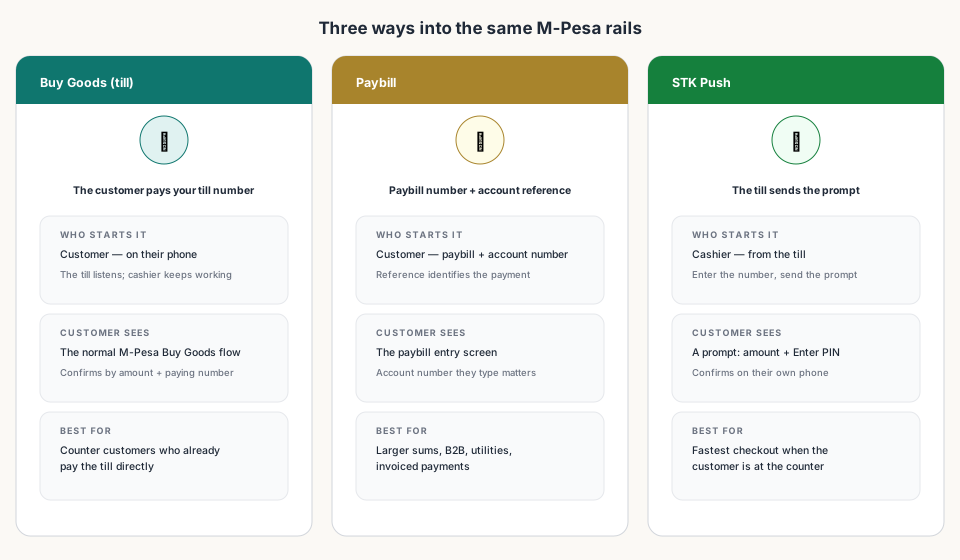
Buy Goods (till) — the till number customers pay directly. It's the everyday shop payment: the customer opens M-Pesa, chooses Buy Goods, enters your till number and the amount, and pays. Kopo Kopo confirms the payment to your POS the moment it happens, and the till matches it to the open sale.
Paybill — a business number with an account reference. The customer pays the paybill number and types a reference (often an invoice or customer number). It's the channel for larger sums, utilities, and business-to-business payments, where identifying who paid matters as much as the amount.
STK Push — the till-initiated prompt. The cashier sends the payment prompt to the customer's phone; the customer confirms the amount and enters their PIN. It's the fastest checkout at the counter because nothing has to be typed.
2. Side by Side
| Buy Goods (till) | Paybill | STK Push | |
|---|---|---|---|
| Who starts it | Customer | Customer | Cashier, from the till |
| What's entered | Till number + amount | Paybill + account reference | Nothing by the customer — just confirm |
| Best for | Everyday counter sales | Larger sums, B2B, invoices | Fast checkout at the counter |
| Confirmation at the till | Webhook, by amount + number | Reference-matched | Confirmation on PIN entry |
3. What Actually Matters at Your Counter
For a shop, two rules of thumb cover most cases. First: run the till (Buy Goods) as the base — it's what customers expect and already know. Second: use STK Push as the fast lane for checkout — it removes the typing without asking customers to change anything. Paybill earns its place when payments are larger or invoiced: a supplier, a school, a business customer.
- Small retail at the counter — till plus STK Push.
- Larger or business payments — paybill with a reference.
- Remote or phone orders — STK Push (the till sends the prompt to the orderer).
- Customers who 'just pay the till' — always keep the till number working.
4. Setting Up the Right Mix
On Kiosk the mix is one gateway, not three projects: the KopoKopo config holds your till number (the STK till) and the Webhook tills list (any extra tills that should fire payment confirmations). One subscription registers them all. Paybill, if you add it, is its own number to display and its own payments to match — Kopo Kopo handles the confirmations either way.
Read next:
- Kopo Kopo Integration for POS Systems: The Complete GuideThe pillar guide — how every channel connects to a till.
- Setting Up STK Push Checkout on Your POSThe fast lane at the counter — states, testing, and fixes.
- How to Connect Kopo Kopo to Your POS SystemWhere your till numbers and webhook tills are configured.
- Kopo Kopo Fees and How They Affect Your MarginsWhat each channel costs, and the hidden costs of going manual.
- Kiosk.ke's Kopo Kopo IntegrationBoth M-Pesa modes, one till record — the deep-dive.
Frequently asked questions
What's the difference between Buy Goods and Paybill?
Buy Goods is the till number customers pay directly for purchases — typical at shop counters. Paybill is a business number with an account reference, usually for larger or business-to-business payments. They're different routes into the same M-Pesa rails.
Do I need all three — till, paybill, and STK?
No. Most shops run till (Buy Goods) plus STK Push: customers who prefer the till number keep paying it, and the cashier uses STK for fast checkout. Add paybill only if you take larger, invoiced, or B2B payments.
Which is fastest at the counter?
STK Push — the prompt is on the customer's phone in seconds and they just confirm. Buy Goods till is just as fast for customers who are already used to paying the till directly.
Can customers still pay my till number if the POS uses STK?
Yes — both modes are built in. The till listens for Buy Goods payments while the cashier keeps working, and STK Push is available for customers at the counter. Same gateway, same sale record.
Is there a cost difference between the channels?
Channel fees can differ and rates change, so the exact numbers live in your Kopo Kopo dashboard. Choose by how your customers pay first — the cost difference is rarely the deciding factor for a shop.
What is the paybill account number for?
It's the reference the customer enters alongside the paybill number, and it's how the business identifies the payment — like an invoice number. The till matches it to the right customer or order.
Related articles
- PaymentsKopo Kopo Integration for POS Systems: The Complete GuideHow Kopo Kopo connects to a POS — Buy Goods tills, STK Push, and signed webhooks that match every M-Pesa payment to a sale automatically. The complete guide for Kenyan retailers.
- Getting startedSetting Up STK Push Checkout on Your POSHow STK Push checkout works at a Kenyan till — the customer gets the prompt on their phone, confirms the amount, and the sale closes itself. Setup, testing, and what can go wrong.
- Getting startedHow to Connect Kopo Kopo to Your POS System (Step-by-Step)Step by step: connect your Kopo Kopo account to your POS — API credentials, environment, till numbers, webhook subscription, and a test payment before you go live.
- GuidesKopo Kopo Fees and How They Affect Your Margins as a RetailerWhat Kopo Kopo charges per transaction, who pays it, and how to keep mobile money costs from eating your margin.
- PaymentsKiosk.ke's Kopo Kopo Integration: Why It's the Best for Kenyan ShopsHow Kiosk.ke connects Kopo Kopo to your till — native STK Push, Buy Goods till matching, signed webhooks, and supplier Send Money — and why that makes it the best Kopo Kopo integration in Kenya.
Ready for a POS built for Kenya?
Start free on Kiosk.ke — barcode POS, native M-Pesa STK, offline sales, and an online storefront from one stock count.