
Series 05
Kopo Kopo
Series 05
Kopo Kopo
Guides
Kopo Kopo Fees and How They Affect Your Margins as a Retailer
What Kopo Kopo charges per transaction, who pays it, and how to keep mobile money costs from eating your margin.
25 August 2026 · Kiosk
Every payment channel carries a cost, and mobile money is no exception. For a Kenyan shop, the question isn't whether M-Pesa costs something — it's whether you're paying the visible channel fee or also the hidden costs that quietly eat margins. This guide separates the two.
1. How Mobile Money Fees Work for a Shop
When a customer pays your till, the transaction carries a merchant cost — a charge on receiving the money, set by the mobile money product and layered by your payment provider. Where the numbers live: your Kopo Kopo dashboard and your agreement. The exact rate is one lookup away; the shape of the cost is what this guide teaches.
2. The Math, Made Visible
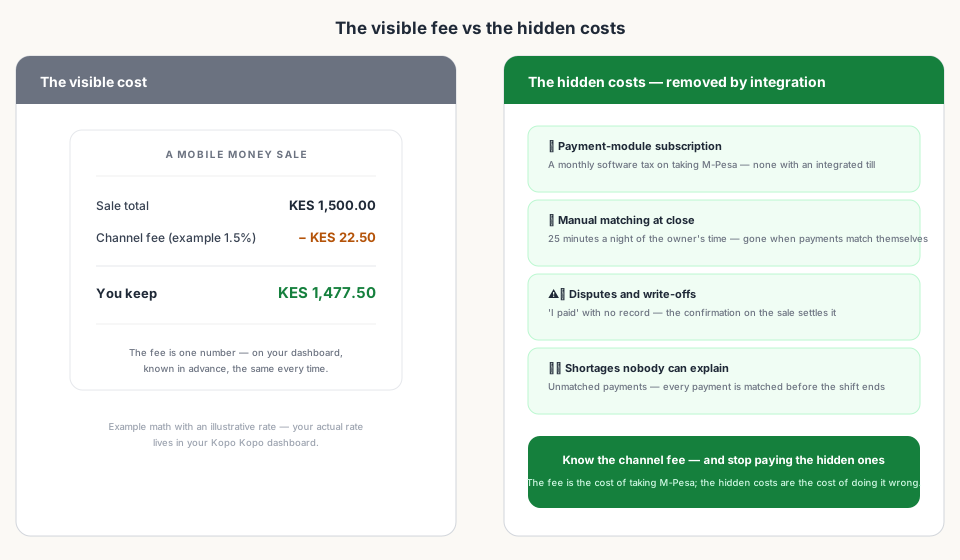
The fee is proportional — a percentage of the sale, charged per transaction. That means it scales with your success: more sales, more fees, and small tickets add up fast because the charge repeats on every single payment.
- A 1.5% charge on a KES 500 sale is KES 7.50.
- The same rate on a KES 1,500 sale is KES 22.50.
- A hundred KES 500 sales a day is KES 750 in fees — about the same as four of those sales.
Those are example rates — yours may differ. The point is the shape: the fee is small per sale but constant, so it belongs in your pricing thinking, not just your monthly review.
3. Who Pays — and What to Do About It
For most shops, the merchant carries the cost of receiving mobile money. That leaves two honest options: price it in, or eat it as the cost of taking M-Pesa — which, for many shops, is simply the cost of doing business in Kenya. What doesn't work is pretending it isn't there and discovering the margin leak at month end.
4. What the POS Changes
An integrated till doesn't remove the channel fee — but it removes the hidden costs around it, and it makes the visible one accurate. The shift report totals M-Pesa from confirmed payments, so your sales figures reflect what actually landed. You see the real channel mix and the real volume, which is what pricing decisions need.
- No payment-module subscription — integration is part of the plan, not a per-payment add-on.
- No manual matching labor — the close is a report, not a ritual.
- No disputes with no record — every payment is tied to a sale.
- Accurate totals — M-Pesa figures come from confirmations, not memory.
5. Questions to Ask Before You Worry
- Is the charge per transaction or a flat rate? (Usually per transaction.)
- Who bears it — me, or does my pricing already cover it?
- Does my till show gross sales or the net after charges?
- Am I paying any software fee on top of the channel fee?
Read next:
- Kopo Kopo Integration for POS Systems: The Complete GuideThe pillar guide — how Kopo Kopo connects to a till, start to finish.
- Kopo Kopo Buy Goods vs. Till Number vs. PaybillChannel choice — where fee differences start.
- The Real Cost of 'Free' SoftwareHidden fees beyond the channel charge — module fees and add-ons.
- End-of-Day Reconciliation: Manual vs. AutomatedThe 125-hours-a-year labor cost that integration removes.
- Is Kopo Kopo Safe? Security and Settlement ExplainedWhere the money sits, and how withdrawals work.
Frequently asked questions
What does Kopo Kopo charge a retailer?
Kopo Kopo charges per-transaction fees that vary by channel and can change, so the exact numbers live in your Kopo Kopo dashboard and your agreement. The important point for a shop: an integrated till doesn't add its own per-payment software fee on top.
Who pays the fee — me or the customer?
Usually the merchant carries the cost of receiving mobile money. Some shops price it into their goods or round up; that's a pricing decision, not a till setting. Know your rate, then decide.
How much is the fee on a typical sale?
It depends on your rate and channel. As a sense of the math: a 1.5% charge on a KES 1,500 sale is KES 22.50 — use your actual dashboard rate, not an example.
Do fees differ between STK Push, Buy Goods, and Paybill?
Channel rates can differ, and they change over time. Choose channels for how your customers pay; check your dashboard for the current rate of each one.
Can I pass the fee to customers?
Some shops round prices up or add a small payment handling note. There's no universal rule, and surprising customers at checkout costs goodwill — price it in gently or eat it as the cost of taking mobile money.
Does an integrated POS add its own fees?
No. Integration is part of the POS plan — there's no per-payment module fee or payment-plugin subscription. You pay the channel fee, not a software tax on top of it.
Related articles
- PaymentsKopo Kopo Integration for POS Systems: The Complete GuideHow Kopo Kopo connects to a POS — Buy Goods tills, STK Push, and signed webhooks that match every M-Pesa payment to a sale automatically. The complete guide for Kenyan retailers.
- GuidesThe Real Cost of 'Free' SoftwareHidden fees, add-on modules, and implementation hours — what 'free' POS and ERP tools often cost in practice.
- PaymentsKopo Kopo Buy Goods vs. Till Number vs. Paybill: Which One for Your Shop?Buy Goods (till), Paybill, and STK Push all move money through M-Pesa — but they behave differently at the counter. Which one belongs in your shop's till setup?
- OperationsEnd-of-Day Reconciliation: Manual M-Pesa Checking vs. Automated POS MatchingThe nightly ritual of matching M-Pesa messages to sales — and what your close looks like when the till does the matching instead.
- GuidesIs Kopo Kopo Safe? Security and Settlement ExplainedWhere your money sits, who sees your credentials, and how signed webhooks keep payment confirmations from being faked. Kopo Kopo security for retailers.
Ready for a POS built for Kenya?
Start free on Kiosk.ke — barcode POS, native M-Pesa STK, offline sales, and an online storefront from one stock count.