
Series 06
eTIMS & Taxes
Series 06
eTIMS & Taxes
Tax & compliance
How to Register for eTIMS in Kenya: Step-by-Step
How to onboard to eTIMS in Kenya — the iTax steps, the four onboarding methods, what a USB token is for, and how a POS handles the whole thing for you.
25 August 2026 · Kiosk
Registering for eTIMS sounds like a bureaucratic expedition — a day of forms and queues. In practice it's an iTax session, a choice of how you want to invoice, and then you're live. Here's the whole process, step by step, so it takes you an hour instead of a week.
What you need before you start
- A KRA PIN — attached to the business, not just to you personally.
- Your business registration (business name on eCitizen, or company documents).
- An active iTax account with your PIN and password.
- A decision on how you want to invoice (see the methods below).
The registration steps
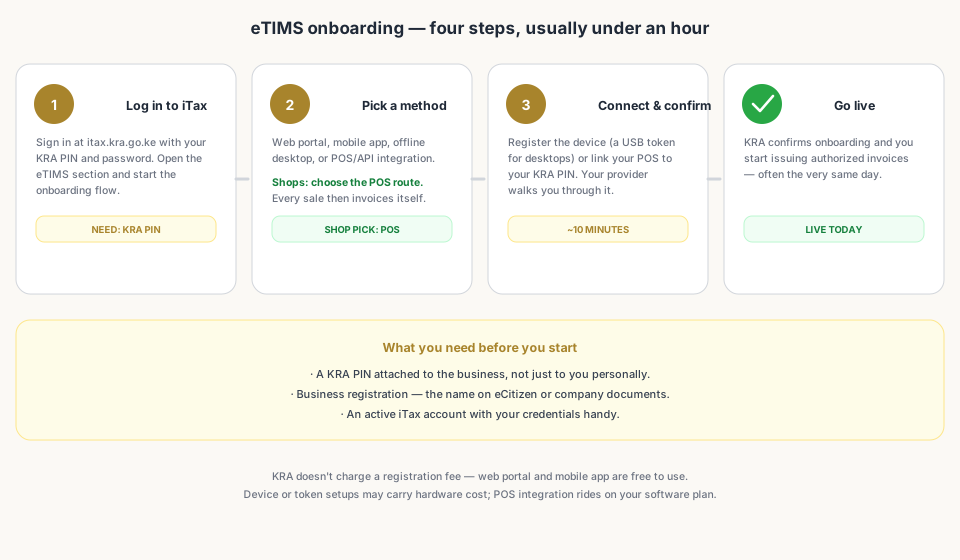
- Log in to iTax (itax.kra.go.ke) with your KRA PIN and password.
- Open the eTIMS section — under registration or the eTIMS menu depending on your dashboard — and start the eTIMS onboarding flow.
- Confirm your business details: name, PIN, address, and the sector you operate in (retail).
- Choose your onboarding method — web portal, mobile app, offline desktop, or POS/API integration.
- For device-based methods, register the device or request your USB token; for POS integration, your provider walks you through connecting your till to your PIN.
- Verify and submit. KRA confirms your onboarding, and you can start issuing authorized invoices — often the same day.
Choosing your invoicing method
| Method | Best for | Effort per invoice |
|---|---|---|
| eTIMS Lite (web portal) | Low-volume traders | Manual — type or upload each invoice |
| eTIMS Mobile App | Traders on the move | Manual — create on your phone |
| Offline desktops + USB token | Small offices, patchy internet | Manual — signed with the token |
| POS / API integration | Shops with a till | Automatic — every sale is an authorized invoice |
After you're onboarded
Once you're live, the discipline is simple: every sale gets an invoice, every invoice carries KRA's authorization, and your numbers stay consistent across your till, your stock, and your returns. If you're on a POS, this is happening in the background — which is the whole point.
- What Is eTIMS in Kenya? The System ExplainedThe background you need before (or after) registering.
- eTIMS and Your POS: How the Right Till Keeps You KRA-ReadyHow integration works and what to look for in a till.
- Taxes for Mini-Marts in Kenya: The Complete eTIMS & KRA GuideThe pillar guide — every tax mapped in one place.
Frequently asked questions
How long does eTIMS registration take?
For most businesses, onboarding through iTax takes less than an hour of your time, and you can start issuing authorized invoices the same day — especially if you use the eTIMS web portal, mobile app, or a POS that handles the integration for you. Physical token or device setups can add a day or two for delivery.
Does eTIMS registration cost money?
KRA does not charge a registration fee for eTIMS onboarding itself. The web portal and mobile app are free. If you choose a device-based setup, you may pay for the USB token or hardware; if you use a POS with built-in eTIMS support, that's part of your software plan, not a KRA charge.
I already have an ETR machine. Do I still need to register for eTIMS?
Yes — eTIMS is the successor to ETR, and KRA has been migrating businesses across. The registration flow asks about your current setup so you can migrate cleanly instead of running both systems. Your accountant or POS provider can help you migrate without losing historical records.
Can my POS register for eTIMS on my behalf?
A POS with eTIMS integration (OSCU/VSCU or API-based) walks you through the onboarding steps and registers the device or integration against your KRA PIN. You still approve it through iTax, but the software does the heavy lifting — which is why most shops prefer it to manual invoicing.
Related articles
- Tax & complianceTaxes for Mini-Marts in Kenya: The Complete eTIMS & KRA GuideEverything a mini-mart owner in Kenya needs to know about tax — eTIMS, VAT, turnover tax, income tax, PAYE, excise, records, and penalties — and how the right till keeps it manageable.
- Tax & complianceWhat Is eTIMS in Kenya? The System ExplainedeTIMS — KRA's Electronic Tax Invoice Management System — explained for shop owners: how invoices get authorized, who must use it, and the four ways to run it.
- Tax & complianceeTIMS and Your POS: How the Right Till Keeps You KRA-ReadyHow eTIMS/POS integration works in Kenya — AUTH codes per sale, offline queues, OSCU/VSCU, and what to look for in a till that makes KRA compliance automatic.
- Getting startedSet Up a POS in Kenya in 30 MinutesHow to set up a POS in Kenya in 30 minutes — create your account, add products, take M-Pesa payments, and stay eTIMS-ready with KRA. No IT project required.
- Tax & complianceRecord-Keeping and KRA Penalties: What Kenyan Shop Owners Must Keep (and Avoid)What records a Kenyan shop must keep and for how long, the KRA penalty schedule for late returns and eTIMS violations, and why automatic records beat reconstruction.
Ready for a POS built for Kenya?
Start free on Kiosk.ke — barcode POS, native M-Pesa STK, offline sales, and an online storefront from one stock count.