
Series 06
eTIMS & Taxes
Series 06
eTIMS & Taxes
Tax & compliance
eTIMS and Your POS: How the Right Till Keeps You KRA-Ready
How eTIMS/POS integration works in Kenya — AUTH codes per sale, offline queues, OSCU/VSCU, and what to look for in a till that makes KRA compliance automatic.
25 August 2026 · Kiosk
Here's the choice every Kenyan shop owner eventually faces: eTIMS invoices generated by hand, or eTIMS invoices generated by the sale itself. The first is how compliance becomes a full-time job. The second is how it disappears into the background. This guide is about the second.
How POS/eTIMS integration works
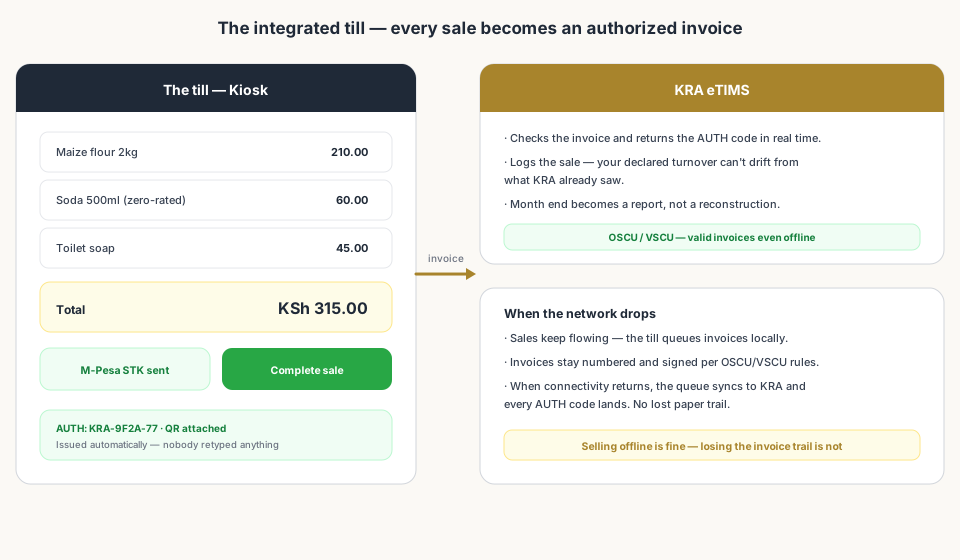
When a till integrates with eTIMS, the invoicing loop becomes automatic: you ring up a sale, the till asks KRA's system for an authorization (AUTH) code, KRA returns it in seconds, the receipt prints with the code and a QR code, and the invoice is logged. The customer gets a proper tax invoice; KRA gets the sale; your record-keeping gets a number to point at. Nobody retypes anything.
That's the core difference from KRA's manual tools — the eTIMS Lite web portal and the mobile app, which require someone to create an invoice per transaction. At a busy counter, manual invoicing quietly stops happening by day two. Integrated invoicing never gets skipped, because skipping it would require stopping the sale.
OSCU, VSCU, and selling through outages
KRA's eTIMS ecosystem includes control-unit standards — OSCU (Offline Sales Control Unit) and VSCU (Virtual Sales Control Unit) — that let authorized devices sign invoices even without a live connection. A POS built on these can keep issuing valid invoices during a network outage and sync them to KRA when you're back online.
This matters more than it sounds. Kenyan shops lose connectivity all the time, and the wrong POS turns every outage into either lost sales or a gap in the invoice trail. The right one turns it into a queue that clears itself. When you evaluate a POS, ask the vendor exactly how offline sales are authorized and synced — vague answers are a red flag.
What to look for in a KRA-ready POS
- Automatic invoicing — every sale generates an authorized invoice without manual steps.
- Offline queue — sales keep flowing and sync cleanly when connectivity returns.
- Tax-per-item accuracy — correct treatment of standard, zero-rated, and exempt goods.
- Reconciled records — invoices that match your stock counts and M-Pesa payments.
- Accountant-friendly exports — monthly summaries your accountant can use without a guided tour.
- Clear onboarding — the vendor walks you through connecting your till to your KRA PIN.
The month-end payoff
With an integrated till, month end is a review instead of a reconstruction: your turnover totals are already filed-ready, your invoices are already with KRA, and your accountant's questions are answered by a report rather than a memory. That's the whole pitch for eTIMS-integrated POS software — it turns the taxman's new system from a burden into a background process.
- Top 10 POS Systems in Kenya (2026) — Ranked & ComparedWhich Kenyan POS platforms are eTIMS-ready.
- Set Up a POS in Kenya in 30 MinutesTill, storefront, M-Pesa, and eTIMS-ready invoices in one afternoon.
- Taxes for Mini-Marts in Kenya: The Complete eTIMS & KRA GuideThe pillar guide — every tax mapped in one place.
Frequently asked questions
How does eTIMS integration with a POS work?
Your till talks to KRA's eTIMS through an integration (API-based, or OSCU/VSCU for offline-capable devices). When you complete a sale, the till requests an authorization (AUTH) code from KRA, prints it on the receipt with a QR code, and logs the invoice — all automatically and in seconds. The manual invoicing of eTIMS Lite or the mobile app is replaced by the sale itself.
What does OSCU/VSCU mean?
They're KRA's device classifications for eTIMS: OSCU (Offline Sales Control Unit) and VSCU (Virtual Sales Control Unit) are control units that sign and authorize invoices, including when connectivity drops. A POS built on these standards can keep issuing valid invoices offline and sync them when the network returns.
What if the internet drops at my shop?
The right POS keeps selling. Sales are queued locally, invoices stay numbered and signed (per OSCU/VSCU rules), and everything syncs to KRA when connectivity returns. Selling offline is fine; losing the invoice trail is not. Ask a POS vendor specifically how their offline queue handles eTIMS authorization.
Does Kiosk.ke support eTIMS?
Kiosk.ke includes built-in tax reporting for day-to-day retail: invoices generated at the till are kept ready for KRA eTIMS reporting, with accurate, dated records that reconcile with your stock and M-Pesa. If eTIMS obligations apply to your shop, that built-in compliance beats reconciling manually at month end.
Related articles
- Tax & complianceTaxes for Mini-Marts in Kenya: The Complete eTIMS & KRA GuideEverything a mini-mart owner in Kenya needs to know about tax — eTIMS, VAT, turnover tax, income tax, PAYE, excise, records, and penalties — and how the right till keeps it manageable.
- Tax & complianceWhat Is eTIMS in Kenya? The System ExplainedeTIMS — KRA's Electronic Tax Invoice Management System — explained for shop owners: how invoices get authorized, who must use it, and the four ways to run it.
- Tax & complianceHow to Register for eTIMS in Kenya: Step-by-StepHow to onboard to eTIMS in Kenya — the iTax steps, the four onboarding methods, what a USB token is for, and how a POS handles the whole thing for you.
- RankingsTop 10 POS Systems in Kenya (2026) — Ranked & ComparedBest POS systems in Kenya for 2026, ranked on setup speed, native M-Pesa, eTIMS readiness, and shop-floor fit. Compare Kiosk.ke, Odoo, SimbaPOS, Tiwi, and more.
- Getting startedSet Up a POS in Kenya in 30 MinutesHow to set up a POS in Kenya in 30 minutes — create your account, add products, take M-Pesa payments, and stay eTIMS-ready with KRA. No IT project required.
- Tax & complianceRecord-Keeping and KRA Penalties: What Kenyan Shop Owners Must Keep (and Avoid)What records a Kenyan shop must keep and for how long, the KRA penalty schedule for late returns and eTIMS violations, and why automatic records beat reconstruction.
Ready for a POS built for Kenya?
Start free on Kiosk.ke — barcode POS, native M-Pesa STK, offline sales, and an online storefront from one stock count.